FRPFile iCloud Bypass Review 2026: Download, Safety & Compatibility

Looking for an FRPFile iCloud Bypass download to deal with an Activation Lock on your own iPhone or iPad? Before installing anything, there is an important issue to understand: in 2026, searches for "FRPFile" can lead to older AIO releases, Ramdisk tools, re-uploaded packages, and newer FRPFILE-branded services with different compatibility claims.
This updated FRPFile iCloud Bypass review explains what the tool is, whether it is safe, what "latest version" actually means, how FRPFile Ramdisk differs from older releases, and what you should check before downloading it.

Quick Verdict: Is FRPFile iCloud Bypass Worth Trying?
FRPFile may still be relevant to users with certain older Apple devices, but the biggest problem in 2026 is identifying the correct release. Current search results mix legacy FRPFile packages, Ramdisk versions, mirrors, and other FRPFILE-branded tools, while their version and compatibility information is not always consistent.
| Question | Quick Answer |
|---|---|
| Is FRPFile free? | Some older releases are distributed as free tools; paid services also appear online. |
| What is the latest FRPFile version? | There is no single release history that can be reliably applied to every FRPFile-branded tool. |
| Is FRPFile safe? | Safety depends heavily on the exact download source and package. |
| Does it support the latest iOS? | Do not assume so; compatibility varies by build. |
| Is FRPFile Ramdisk the same tool? | Not necessarily. Ramdisk builds and older AIO tools may use different workflows. |
| Should you use it first? | Try Apple's official Activation Lock options first when possible. |
The key takeaway is simple: do not download a file only because its title says "FRPFile latest version." Verify the exact build, device support, source, and requirements first.
What Is FRPFile iCloud Bypass?
FRPFile iCloud Bypass is a name associated with third-party tools and services intended for certain Activation Lock and device-service scenarios on iPhones and iPads.
Apple does not call its iPhone and iPad protection "FRP." On Apple devices, the feature that prevents an erased device from being activated by an unauthorized user is officially called Activation Lock, and it is associated with Find My and the owner's Apple Account. This distinction matters because "FRP" normally refers to Factory Reset Protection on Android, while "FRPFile" here is essentially part of the tool's name rather than Apple's terminology.
FRPFile AIO vs. FRPFile Ramdisk Tool
One reason FRPFile searches have become confusing is that several similarly named tools now appear in search results.
| Tool Name | What It Usually Refers To |
|---|---|
| FRPFile iCloud Bypass/AIO | Older desktop utilities associated with selected Activation Lock scenarios |
| FRPFile Ramdisk Tool | Builds that use a temporary ramdisk-based device-service environment |
| FRPFile Activator | A broader name used by some newer FRPFILE-branded tools or services |
| FRPFile Bypass Tool | A generic search phrase that may refer to any of the above |
Current search results include newer FRPFILE Ramdisk tools alongside older FRPFile releases, which means the names should not automatically be treated as one continuously updated product. Before downloading anything, identify which FRPFile tool the page is actually referring to.
FRPFile iCloud Bypass Latest Version and Compatibility
Searching for the FRPFile iCloud Bypass latest version can be misleading because different download pages may display different versions, release dates, and device-support claims. For this reason, it is safer to verify compatibility by the exact file or build instead of relying on a generic "latest version" label.
What to Check Before Using FRPFile
| Item | What You Should Verify |
|---|---|
| Version number | Exact version shown by the developer or distributor |
| Release date | Whether the build is actively maintained |
| Device model | Exact iPhone or iPad generation |
| Chip generation | Some tools target specific hardware generations |
| iOS/iPadOS version | The supported range for that particular build |
| Computer OS | Windows, macOS, or both |
| Additional requirements | Drivers, recovery/DFU mode, or other components |
| Post-use limitations | Whether all normal device functions remain available |
Is FRPFile iCloud Bypass Safe?
There is no universal yes-or-no answer because FRPFile files are distributed through different websites, mirrors, videos, and third-party services. Current search results themselves demonstrate that the brand name is being used for multiple packages and releases. The risk therefore depends mainly on where the file came from and what it asks you to do.
Warning Signs to Check Before Downloading
Be cautious if a download:
- Has no clear developer or release information.
- Does not provide an exact supported-device list.
- Claims to work on every iPhone, iPad, and iOS version.
- Requires you to completely disable antivirus software.
- Requests unnecessary Apple Account credentials.
- Requests an IMEI, serial number, or payment through an unverifiable service.
- Is hosted only on an unknown mirror or shortened download link.
- Claims a "100% success rate" without explaining compatibility limitations.
A security warning does not automatically prove that a file is malicious, but disabling system protection should never be treated as a normal requirement without verifying the package first.
How to Check an FRPFile Download Before Opening It
- Step 1. Confirm the exact version and release date displayed by the source.
- Step 2. Compare your iPhone/iPad model and operating-system version with the stated compatibility list.
- Step 3. Scan the downloaded file using your normal security software rather than disabling protection immediately.
- Step 4. Check whether the publisher provides documentation explaining what files, drivers, or permissions are required.
- Step 5. Avoid entering Apple Account credentials into an unofficial tool.
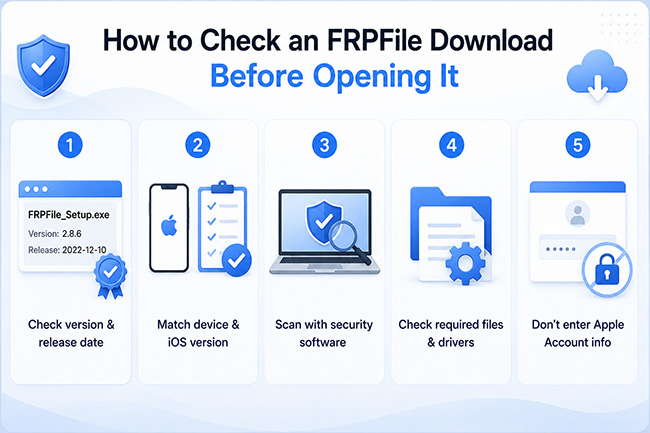
These checks cannot guarantee that a third-party utility is safe, but they can help filter out obvious fake downloads and misleading mirrors.
FRPFile iCloud Bypass Download: What You Should Know
A search for FRPFile iCloud Bypass download may return old tools, re-uploaded installers, Ramdisk builds, videos, paid registration services, and other similarly named packages. Current search results do not show a simple, unified release history that applies to every FRPFile-branded download. Because of that, this article should not tell readers that every result from one domain is automatically the "official latest version."
Before Downloading FRPFile
Ask these five questions:
- 1. Which FRPFile product is this?
AIO, Ramdisk, Activator, or another build? - 2. When was this exact build released?
Do not rely only on "latest" in the page title. - 3. Does it support my exact model?
"Supports iPhone" is not specific enough. - 4. Does it support my exact iOS version?
Compatibility may change significantly between releases. - 5. What happens after the process?
Check whether restarting, updating, restoring, cellular service, iCloud, or other functions have documented limitations.
This is particularly important when dealing with older device-service utilities whose original download pages may have been copied or mirrored elsewhere.
How Does FRPFile iCloud Bypass Work?
The exact workflow depends on which FRPFile build is being used. Some older tools and newer Ramdisk variants rely on different device-service methods, so a single step-by-step tutorial cannot accurately describe every version now appearing under the FRPFile name.
In general, an FRPFile-type workflow may involve:
- Step 1. Checking whether the device and operating-system version are supported.
- Step 2. Installing the required desktop tool and device drivers.
- Step 3. Connecting the authorized iPhone or iPad to the computer.
- Step 4. Following the tool's supported preparation process.
- Step 5. Completing the Activation Lock-related operation and checking what functions remain available afterward.
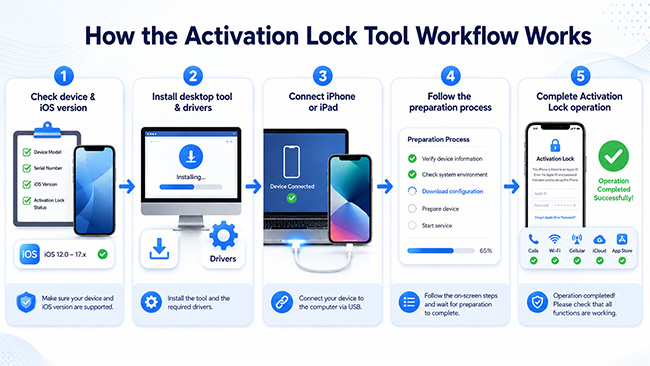
Do not follow an old tutorial simply because the interface looks similar. If the device model, chip, iOS version, or FRPFile build is different, the instructions may no longer apply.
FRPFile iCloud Bypass Pros and Cons
FRPFile can appear attractive because some releases are free and target older devices, but its fragmented download ecosystem makes verification especially important.
 Pros:
Pros:- Free versions can be found: Some older FRPFile releases have been distributed at no upfront cost.
- Focuses on older devices: Certain builds are intended for hardware generations that may no longer be covered by newer tools.
- Multiple tool variants exist: AIO and Ramdisk-style releases target different use cases.
 Cons:
Cons:- Unclear versioning: Different pages may call different builds the "latest version."
- Download-source uncertainty: Mirrors and re-uploaded packages make authenticity harder to verify.
- Compatibility varies: Support depends on the precise device, chip, operating system, and build.
- Security concerns: Unknown installers, or instructions to disable antivirus protection deserve additional scrutiny.
- Post-use limitations may apply: A successful activation-screen operation does not necessarily mean every device function behaves like an officially unlocked device.
- Support can be difficult to verify: Documentation and customer support vary between builds and distributors.
Try Apple's Official Activation Lock Options First
Before using FRPFile or another third-party tool, try Apple's official methods if the device belongs to you. Apple's current Activation Lock support page recommends several routes depending on the situation.
Option 1. Use the Apple Account Linked to the Device
If the iPhone or iPad belongs to you, enter the Apple Account and password originally used to set up the device. If you cannot remember the Apple Account or password, Apple's support process provides account-recovery options before you consider third-party software.
Option 2. Ask the Previous Owner to Remove the Device
If you bought a second-hand device, contact the previous owner. They can sign in to iCloud Find Devices, select the device, and choose Remove to remove the device from their account. The previous owner does not necessarily need to have the iPhone or iPad physically with them.
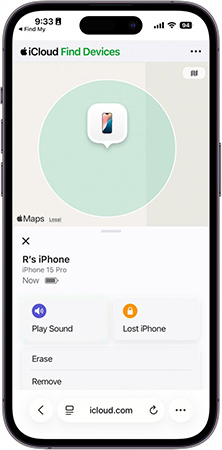
Option 3. Submit an Activation Lock Support Request
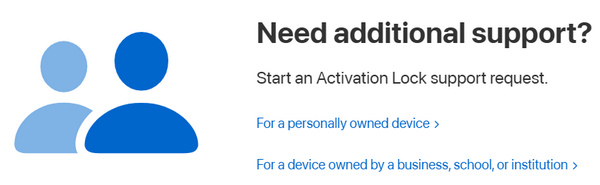
If the device is yours and you have qualifying proof-of-purchase documentation, Apple Support currently allows users to start an Activation Lock support request. These official options are preferable because they remove the ownership issue through Apple's account system rather than relying on a third-party workaround.
A More Clearly Documented FRPFile Alternative: TunesKit iPhone Unlocker
If the official methods are unavailable and you are working with a device you own or are authorized to manage, TunesKit iPhone Unlocker is another option worth comparing with FRPFile. Unlike the fragmented FRPFile download results, TunesKit provides an official product page, current compatibility table, user documentation, and Windows/macOS requirements in one place. Its current feature set includes Remove iCloud Activation Lock alongside screen-passcode, Apple Account, MDM, and other iOS unlocking functions.
For Activation Lock specifically, TunesKit's current technical specifications list iOS 12.0 through iOS 16.7.15 and selected older iPhones and iPads. This is a separate, narrower compatibility range from the software's other unlocking features, so users should check the Activation Lock table rather than assuming that every device supported by TunesKit.
Key Features of TunesKit iPhone Unlocker
Bypass iCloud Activation Lock without password. Turn off Find My without password. High success rate & Easy to use
 600,000+ Downloads
FRPFile vs. TunesKit iPhone Unlocker
| Feature | FRPFile | TunesKit iPhone Unlocker |
|---|---|---|
| Download source | Varies by build/source | Official TunesKit download |
| Version information | Can be inconsistent | Published by TunesKit |
| Compatibility list | Depends on release | Official Tech Specs available |
| Activation Lock feature | Selected tools/builds | Dedicated supported mode |
| Windows/macOS | Depends on FRPFile build | Both platforms supported |
| Documentation | Varies | Official guides available |
| Customer support | Depends on distributor | TunesKit support available |
| Newest devices | Do not assume support | Activation Lock compatibility is specifically limited |
FAQs About FRPFile iCloud Bypass
-
Is FRPFile iCloud Bypass free?
Some older FRPFile releases are distributed as free tools, while paid registration and newer FRPFILE-branded services also appear online. Because the name is used for multiple packages, check exactly what you are downloading before assuming that every FRPFile tool is free.
-
Is FRPFile Ramdisk the same as FRPFile iCloud Bypass?
Not always. Older FRPFile iCloud Bypass/AIO tools and newer FRPFile Ramdisk builds can use different workflows and compatibility requirements. Treat them as separate builds unless the developer documentation clearly identifies them as versions of the same product.
Conclusion
FRPFile iCloud Bypass still appears in searches for Activation Lock tools, but using it in 2026 requires more caution than simply downloading a file labeled "latest version." Older AIO tools, newer Ramdisk builds, mirrors, and other FRPFILE-branded releases are now mixed together online, making version, compatibility, and source verification essential.
If the device belongs to you, first try Apple's official Activation Lock options. When comparing third-party alternatives, TunesKit iPhone Unlocker offers a more clearly documented option with an official installer and published Activation Lock compatibility table. Just remember that its Activation Lock mode has a specific supported-device and iOS range, so check compatibility before proceeding.