


CellUnlocker Review: Can It Really Unlock iCloud Activation Lock?

Being locked out of an iPhone or iPad due to iCloud Activation Lock can feel overwhelming, especially when you don't have access to the original Apple ID. In this situation, many users begin searching for third-party solutions and quickly come across terms like "CellUnlocker review" or "CellUnlocker iCloud unlock."
This article is designed to give you a realistic, evidence-based review of CellUnlocker, focusing specifically on whether it can help unlock iCloud Activation Lock, what risks are involved, and what alternatives may be safer or more effective.
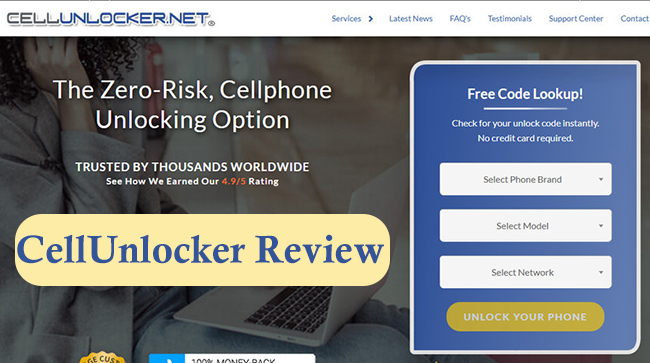
Part 1. Why Users Look for CellUnlocker to Unlock iCloud Activation Lock?
Before evaluating CellUnlocker itself, it's important to understand why so many users are searching for this service in the first place. The demand doesn't come from curiosity - it comes from very real and frustrating situations where standard solutions seem unavailable.
Most users searching for CellUnlocker review are dealing with one of these common problems:
- They forgot the Apple ID or password linked to the device.
- They purchased a second-hand iPhone or iPad that's still tied to the previous owner.
- They reset a device and unexpectedly hit the Activation Lock screen.
Part 2. Full Review of CellUnlocker
2.1 What is CellUnlocker
Now that the technical background is clear, let's look at what CellUnlocker actually is and what type of service it offers. This context is important because CellUnlocker did not originally build its reputation around iCloud-related services.
Cellunlocker is an online phone unlocking platform best known for:
- SIM network unlocking
- Carrier lock removal using IMEI information
Over time, the service expanded its offerings to include iCloud Activation Lock-related services, which is where most user controversy and confusion begin.
Key characteristics of CellUnlocker:
- No software installation required
- Entirely web-based
- Requires IMEI or serial number submission
- Limited transparency on technical processes.
2.2 How CellUnlocker Claims to Unlock iCloud Activation Lock
Understanding CellUnlocker's claimed process is essential before judging its effectiveness. Many users assume there is a technical "unlock code," but CellUnlocker does not clearly describe such a mechanism.
Based on publicly available information, the typical workflow looks like this:
- Submit IMEI or serial number
- Pay an initial service or eligibility fee
- Wait for remote processing
- Receive confirmation or follow-up
2.3 Does CellUnlocker Actually Work? (Based on User Reports)
To move beyond marketing claims, it's necessary to examine real user experiences. This is one of the most important sections for readers trying to avoid wasted time or money. Across review platforms and forums, feedback regarding CellUnlocker's iCloud Activation Lock removal is highly inconsistent.
What Users Commonly Report:
- Occasional success claims in limited scenarios
- Many reports of no unlock after payment
- Requests for additional fees mid-process
Recurring Complaints:
- Long delays with minimal updates
- Refund difficulties
- Confusion caused by similarly named services
2.4 Pros and Cons of Using CellUnlocker
After reviewing how the service works and what users report, it's helpful to summarize the clear advantages and disadvantages in a balanced way.
 Pros:
Pros:- Simple, no-software process
- No jailbreak required
- Easy submission for non-technical users
 Cons:
Cons:- No verified explanation of iCloud unlock method
- High failure rate reported by users
- Refund conditions may be restrictive
- Inherent risk due to Apple's server-side lock
2.5 Pricing, Refunds, and Potential Risks
Cost is often a deciding factor for users considering CellUnlocker, but pricing alone does not tell the full story. Understanding the financial and privacy risks is equally important.
Users frequently report:
- Initial fees for eligibility checks
- Additional charges later in the process
- Refunds that depend on strict conditions
Potential risks include:
- Paying without receiving an unlock
- Sharing sensitive device identifiers
- Relying on a service with limited accountability
2.6 How to Use CellUnlocker to Unlock iCloud Activation Lock
For users who still want to try CellUnlocker despite the risks and limitations, it's important to understand how the process typically works in practice. This section outlines the general steps users report following when attempting to use CellUnlocker for iCloud Activation Lock removal.
Step 1. Find the IMEI number on your iPhone.
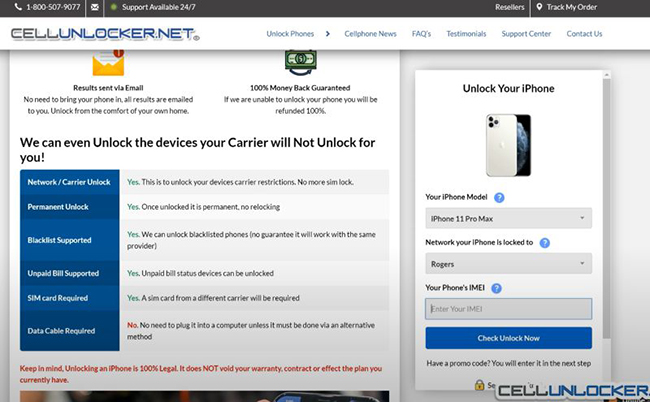
Step 2. Go to the official CellUnlocker website to select the service related to iCloud Activation Lock unlock.
Step 3. Choose your device model (iPhone or iPad) and enter the required device details.
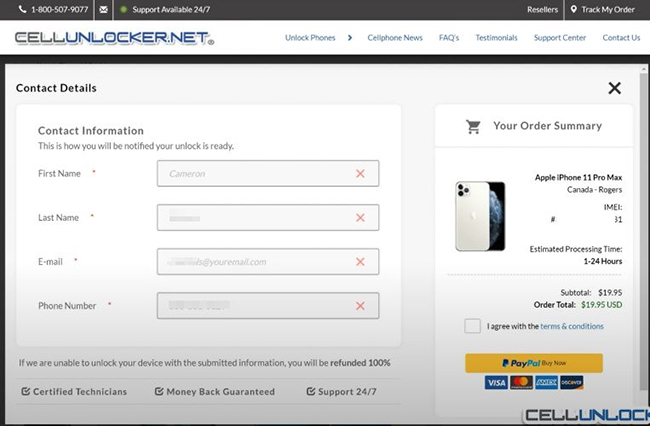
Step 4. After entering your device information, CellUnlocker typically requires an upfront payment and email contact details for status updates.
Step 5. Once payment is completed, your request enters a waiting period. Processing time may range from a few days to several weeks. Status updates are usually provided via email.
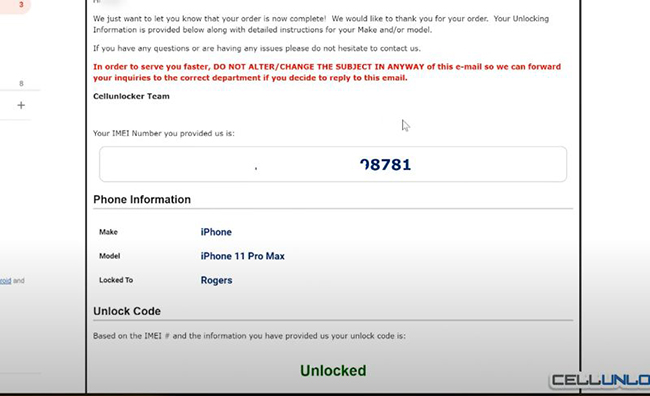
Step 6. If the process is successful, you will receive an email that says "Unblocked."
Part 3. Best Alternative to CellUnlocker: Unlock iCloud Lock without IMEI
For users who decide to try a software-based approach instead of an online IMEI service, TunesKit Activation Unlocker provides a more hands-on method.
Tuneskit Activation Unlocker is a desktop-based tool designed to help users bypass the iCloud Activation Lock screen on certain iPhone and iPad models. Unlike online IMEI services, it requires a computer connection and local interaction with the device.
Why Choose TunesKit Activation Unlocker?
Remove Activation Lock without password. Easy to use & high success rate. High success rate & Easy to use. iPhone, iPad, iPod Touch are supported.
 600,000+ Downloads
The following steps will guide you to remove iCloud Activation Lock on your iPhone via TunesKit Activation Unlocker.
Step 1Connect device to computer
Download and install TunesKit Activation Unlocker on a Windows or macOS computer. Use a USB cable to connect the iPhone or iPad to the computer. Open the software and then click the Remove iCloud Activation Lock feature. Click the Start button to continue.

Step 2Jailbreak your device
You should jailbreak your device by following the tutorial. The detailed steps will be shown. Once the jailbreak process is ended, you should reboot your computer.

 See more:
Step 3Remove iCloud Activation Lock
Return to TunesKit Activation Unlocker and then click the Start to Remove button to begin the Activation Lock bypass.

Part 4. Conclusion
CellUnlocker may work for SIM or carrier unlocks, but iCloud Activation Lock removal is unreliable. Compared with it, tools like TunesKit Activation Unlocker can offer more stable and effective services in terms of iCloud Activation Lock removal. If you are looking for a reliable tool, professional unlock tool would be better choice.


