F3arRa1n Review 2026: Is It Safe, Free & Still Working?

If you're looking for a way to deal with Activation Lock on an older iPhone or iPad, you may have come across F3arRa1n. The tool has been around for several years, but its features, pricing, and compatibility have changed considerably.
So, does F3arRa1n still work in 2026? Is it free and safe to download? This updated F3arRa1n review covers its current features, official download, compatibility, pricing, safety concerns, user feedback, pros and cons, and how it compares with a more guided alternative such as TunesKit iPhone Unlocker.

Quick Verdict: Is F3arRa1n Worth Using in 2026?
F3arRa1n is still actively maintained and can work on compatible iPhones and iPads, but compatibility depends heavily on the device, processor, operating-system version, and activation process. It is not simply an "iOS 12–14 bypass tool" anymore.
Its current documentation covers different workflows for Hello activation, passcode-related activation, Open Menu scenarios, and MDM, with Checkra1n or Palera1n-based preparation used for some A7–A11 devices. Some processes are free, while others require credits.
| Question | Quick Answer |
|---|---|
| Does F3arRa1n still work? | Yes, on compatible devices and supported processes |
| Is F3arRa1n free? | Partly; some processes are free, while others require credits |
| Windows support? | Yes |
| macOS support? | Yes |
| Linux support? | Official documentation currently lists it as upcoming |
| Does it require jailbreak? | Depends on the device and process |
| Does it support iOS 15+? | Yes, certain documented workflows cover newer OS versions |
| Is it beginner-friendly? | Less so than a fully guided commercial unlocker |
| Main drawback | Complex, process-specific compatibility |
For users comfortable with DFU mode, jailbreak-related workflows, compatibility checks, and troubleshooting, F3arRa1n can be worth considering on a supported device. If you prefer a simpler desktop workflow with clearly published compatibility, TunesKit iPhone Unlocker may be easier to use.
What Is F3arRa1n?
F3arRa1n is an iDevice activation utility for Windows and macOS. Rather than offering only one Activation Lock function, its current documentation separates different device states and processes. These include:
- Hello Activation – for devices at the initial Hello/setup screen;
- Passcode Activation – for certain locked or disabled-device scenarios;
- Open Menu processes – for compatible devices that are already activated;
- MDM-related activation – for certain managed-device setup scenarios;
- Toolbox and jailbreak utilities – used as preparation for some supported processes.
Its current documentation also distinguishes between Checkra1n workflows for certain A7–A11 devices on older operating systems and Palera1n Rootless for some newer operating-system versions. This is why F3arRa1n compatibility can no longer be summarized accurately with a single statement such as "supports iOS 12 to iOS 14.8."

F3arRa1n Download: Where to Get the Latest Version
If you decide to test F3arRa1n, use the official F3arRa1n website and documentation rather than an unknown third-party mirror. The current official documentation provides installers for Windows and macOS.
Linux is listed in the documentation as a future option rather than a finished mainstream release. The same documentation refers to the 7.0 generation of the tool as part of its newer development lineage. Because F3arRa1n is actively updated, the exact version number can change, so checking the official download page before installing is more reliable than relying on an old version number from a review.

Before Downloading F3arRa1n
A few precautions are worth taking:
- 1. Confirm that you are using the official website.
- 2. Check whether your device and desired process are supported before paying.
- 3. Keep a backup of important data whenever possible.
- 4. Do not assume an old tutorial applies to the current release.
- 5. Pay attention to security warnings rather than automatically dismissing them.
Is F3arRa1n Free?
F3arRa1n is partly free rather than completely free.
The official site currently lists a number of legacy iPhone and iPad models with free processes, including various iPhone 5s, iPhone 6/6 Plus, iPhone 6s, iPhone 7, iPhone 8, iPhone X, and older iPad configurations. However, other activation processes can require credits.
F3arRa1n's official documentation explains that after the tool checks compatibility, it can display the compatible processes together with their required credit cost. Users then choose between an available free process and a paid option where applicable. Therefore, the more accurate answer is that F3arRa1n is free to download and offers some free processes, but certain device and activation scenarios require paid credits.
Do not purchase credits until the tool has confirmed that your specific device and process are compatible.
F3arRa1n Compatibility: Which Devices and iOS Versions Are Supported?
One of the biggest changes from older F3arRa1n reviews is compatibility. Older information often states that F3arRa1n only works with iOS 12.0–14.8. That is no longer an accurate description of the current tool.
F3arRa1n's current official documentation includes:
- Checkra1n for certain A7–A11 devices on OS 12–14;
- Palera1n Rootless for certain A7–A11 devices on newer OS versions;
- an OS 15+ path within its documented passcode workflow;
- separate Hello, Passcode, Open Menu, and MDM processes;
- MDM documentation extending into current operating-system generations.
However, this does not mean every iPhone running a newer version is supported.
What Determines Compatibility?
F3arRa1n compatibility can depend on:
- iPhone or iPad model;
- processor generation;
- iOS/iPadOS version;
- whether the device is on the Hello screen or already activated;
- whether a passcode-related process is required;
- whether a compatible exploit or jailbreak is available;
- the specific activation process selected.
For this reason, the safest approach is to connect the authorized device and use F3arRa1n's own compatibility check before purchasing credits or starting a process.
Does F3arRa1n Support iOS 15 or Later?
Yes, some current F3arRa1n workflows support devices running iOS 15 or later.
The official documentation specifically includes Palera1n Rootless and OS 15+ procedures for certain compatible devices. Support remains process- and hardware-dependent, so "iOS 15 supported" should not be interpreted as universal support for every iPhone running iOS 15 or newer.
Is F3arRa1n Safe to Download and Use?
There is no useful way to answer this with a simple "100% safe" or "unsafe."
F3arRa1n provides an official website, documentation, Windows/macOS installers, and an active user base. However, its Windows documentation also acknowledges that antivirus programs can flag the software because it uses exploits to communicate with and process supported devices. F3arRa1n describes these detections as false positives. That claim comes from the developer itself, so users should still apply normal security precautions.
What to Check Before Opening F3arRa1n
- Download it only from the official source.
- Scan the installer with your normal security software.
- Avoid random repackaged versions and download mirrors.
- Understand why administrator permissions are requested.
- Check the current documentation before changing antivirus settings.
- Back up the device where possible.
- Never use the software on a device you do not own or have permission to manage.
A security warning should not automatically be assumed to be harmless simply because the publisher describes it as a false positive.
Does F3arRa1n Require Jailbreak?
Sometimes. The current documentation uses Checkra1n or Palera1n Rootless as part of some A7–A11 workflows. Other processes can have different preparation requirements. This makes F3arRa1n more technically demanding than an unlocker that handles most preparation automatically.
Does F3arRa1n Really Work?
F3arRa1n can work, but only when the device matches a supported process.
The tool remains actively documented and its current workflows cover several device states. Its own compatibility checker is therefore more useful than relying on a general claim that the program "works on iOS X to iOS Y." The result can also vary depending on the type of process used. Before proceeding, check what functions will remain available afterward.
You should pay particular attention to:
- cellular service;
- calls and mobile data;
- iCloud sign-in;
- FaceTime and iMessage;
- reboot behavior;
- restoring or updating the device;
- whether the activation state persists.
These limitations can differ between services and device configurations. If the linked Apple Account is yours, Apple's official recovery and Activation Lock removal options remain preferable because they restore legitimate account access instead of relying on a device-specific activation process. Apple also offers an Activation Lock support request when you have valid proof of purchase.
What Do Users Say About F3arRa1n?
User feedback about F3arRa1n is generally positive, although experiences are not uniform. At the time of our latest check, F3arRa1n had 87 reviews and a TrustScore of 4.6/5 on Trustpilot. Reviews include reports from users who successfully used the software on compatible older iPhones and appreciated its free or low-cost options.

Positive Feedback
Users commonly mention:
- successful results on compatible legacy devices;
- useful free options;
- relatively straightforward instructions once compatibility is confirmed;
- responsive support in some cases.
There was also a January 2026 review describing a successful experience with the Activation Lock-related functionality.

Negative Feedback
One 2025 reviewer reported a problem where purchased credits did not appear in their account and said they had difficulty getting support. Other feedback shows that compatibility remains an important limitation.

User reviews are individual experiences rather than independent technical tests, so they cannot guarantee that F3arRa1n will work on a particular iPhone or iPad.
F3arRa1n Pros and Cons
F3arRa1n has become more capable than many older reviews suggest, but it is still best suited to users who understand its compatibility requirements.
 Pros:
Pros:- Still actively maintained in 2026
- Available for Windows and macOS
- Supports multiple activation scenarios
- Some device/process combinations are free
- Built-in compatibility checking
- Covers both legacy and some newer OS workflows
- Official documentation is available
- Credit-based pricing means some users only pay for the process they need
 Cons:
Cons:- Compatibility is complex and highly process-specific
- Some workflows require DFU or jailbreak-related preparation
- Not every new iPhone or iOS version is supported
- Some processes require paid credits
- Registration is required for tool access
- Antivirus warnings can appear
- Post-activation functionality can vary
- Less beginner-friendly than a guided desktop unlocker
F3arRa1n Alternative: TunesKit iPhone Unlocker
If your main goal is removing Activation Lock from a supported iPhone and you prefer a more guided workflow, TunesKit iPhone Unlocker is another option to consider. TunesKit has now integrated Activation Lock removal feature into TunesKit iPhone Unlocker.
The current TunesKit iPhone Unlocker product page lists Activation Lock removal support for iPhone 5s through iPhone X running iOS 12.0–16.7.15. TunesKit's May 2026 V3.5 release specifically introduced a jailbreak-free Activation Lock process for iPhone 6s through iPhone X within the supported system range.
Why Consider TunesKit iPhone Unlocker?
Compared with F3arRa1n, TunesKit iPhone Unlocker is designed around a more guided desktop workflow. For supported devices, you do not need to manually install Checkra1n or Palera1n, and the current Activation Lock process guides you through the required device preparation from within the application.
 600,000+ Downloads
How to Use TunesKit iPhone Unlocker for Activation Lock
- Step 1. Install TunesKit iPhone Unlocker on your Windows PC or Mac, connect the iPhone, and choose Remove iCloud Activation Lock. Click Start and follow the onscreen instructions.
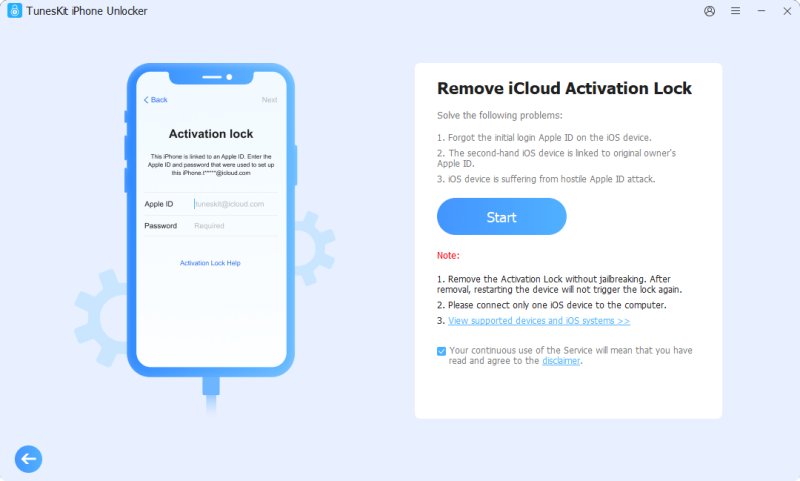
- Step 2. Depending on the supported device, TunesKit guides you through the required recovery/DFU preparation.
- Step 3. After the program recognizes the supported device state, start the removal process and keep the iPhone connected until it finishes.
Before starting, confirm that your exact iPhone model and iOS version are supported. Apple's official removal options should still be used first when you have access to the Apple Account, previous owner, or acceptable proof of purchase.
F3arRa1n vs TunesKit iPhone Unlocker
| Feature | F3arRa1n | TunesKit iPhone Unlocker |
|---|---|---|
| Best for | Users comfortable with technical, process-specific activation tools | Users wanting a guided Activation Lock workflow |
| Windows | Yes | Yes |
| macOS | Yes | Yes |
| Free options | Some processes are free | Free download/trial; unlocking requires a license |
| Pricing model | Free or credit-based depending on process | License-based |
| Jailbreak | Required for some workflows | No manual jailbreak on currently supported jailbreak-free models |
| Compatibility | Varies by device and process | Published fixed device/iOS range |
| Ease of use | Moderate to technical | More beginner-friendly |
| Other unlock features | Activation-focused toolbox | Screen passcode, Apple ID, MDM, Screen Time, Activation Lock and more |
FAQs About F3arRa1n
-
What is the latest version of F3arRa1n?
F3arRa1n remains actively maintained, and its official documentation references the newer 7.0 development generation. Because releases and supported processes change frequently, check the official site for the latest installer instead of relying on a fixed version number in an older review.
-
Does F3arRa1n require jailbreak?
Some F3arRa1n processes require Checkra1n or Palera1n-based preparation, while requirements vary for other processes. Check the current compatibility information before starting.
-
Why does antivirus detect F3arRa1n?
The developer says some antivirus products flag F3arRa1n because the program uses exploits required for certain device processes. That explanation comes from F3arRa1n itself, so you should still verify the download source and evaluate any security warning before changing antivirus settings.
Final Verdict
F3arRa1n is still active in 2026 and offers more device-processing options than older reviews suggest. Some processes are free, while others require credits, and compatibility varies significantly by device, OS version, and activation scenario.
It is better suited to users comfortable with technical preparation and troubleshooting. If you want a more guided Activation Lock workflow on a supported older iPhone, TunesKit iPhone Unlocker is easier to operate and now offers jailbreak-free removal on supported models. Always check compatibility before downloading or paying.