Should I Jailbreak My iPhone? Pros and Cons
The iPhone is widely known for its sleek design, powerful performance, and secure iOS ecosystem. However, some users are not satisfied with Apple's restrictions on customization, app installation, and system control. To gain more freedom and access to additional features, many people consider iPhone jailbreaking. But is it really worth it? Should I jailbreak my iPhone? In this article, we will explore the pros and cons of iPhone jailbreaking to help you decide whether it is the right choice for you.

What Does It Mean to Jailbreak an iPhone?
Apple tightly controls the iOS ecosystem, strictly dictating what software can be installed and how the interface operates. This closed environment is designed to maximize security and ensure a smooth user experience, but it can feel restrictive to power users who want total control over their devices.
Jailbreaking is the process of exploiting vulnerabilities in iOS to bypass these manufacturer restrictions. By breaking out of Apple's secure "sandbox," users gain root access to the device's file system. This elevated privilege allows you to install unauthorized software, alter core system files, and completely overhaul the user interface in ways Apple never intended.
While the process itself is legal in many regions, it remains a direct violation of Apple's End User License Agreement. Proceeding with a jailbreak means you are taking full responsibility for the device, as Apple will deny warranty service for any software issues caused by unauthorized modifications.

Pros and Cons of Jailbreaking an iPhone
Sometimes it may be difficult for users to decide whether or not to jailbreak their iPhones. Thus we here list out some reasons why you should jailbreak your iOS device as well as some risks after jailbreaking iPhone. You can make a wiser decision after reading through it. Now let's look at the pros and cons of jailbreaking an iPhone as follows.
 Pros:
Pros:- Deep System Customization: While Apple now offers basic widget and lock screen adjustments, jailbreaking allows for profound visual overhauls. You can completely redesign the SpringBoard, change core system animations, and apply custom icon packs that alter the fundamental look of the OS.
- Unrestricted App Sideloading: Jailbreaking removes the barrier of the official App Store. This gives you absolute freedom to install third-party applications, specialized utility tools, and retro game emulators that Apple's review team would otherwise reject.
- Advanced File Management: It grants total visibility into the device's internal directory. This allows advanced users to manage files exactly like they would on a desktop computer, moving data freely without relying on iTunes or the Files app.
 Cons:
Cons:- Severe Security Vulnerabilities: By dismantling Apple's protective barriers, your phone becomes highly susceptible to malware and spyware. Because there is no traditional antivirus software for iOS, a malicious app installed from an unverified source can quietly steal your personal data, passwords, and banking information.
- Broken App Functionality: Many high-security applications actively scan your phone to see if it has been compromised. If you jailbreak your device, you will likely find that your banking apps, mobile payment platforms, and certain digital protected streaming services will simply refuse to open.
- System Instability and Battery Drain: Unauthorized tweaks are rarely optimized for battery life or system performance. Running unapproved background modifications frequently leads to random device reboots, frozen screens, and significantly faster battery degradation.
- The Danger of "Bricking": The actual process of injecting the jailbreak exploit is inherently risky, especially on newer iOS versions. A single error during installation can corrupt the operating system, rendering the iPhone completely unresponsive until it is forcibly factory-restored via a computer.

What to Consider Before Jailbreaking Your iPhone
If you have weighed the pros and cons and decided to proceed with jailbreaking, your absolute first priority must be data security. There is a common misconception that the jailbreak process automatically erases all your data, but a successful installation actually leaves your files completely intact.
However, because jailbreaking modifies core system files, a single error during the process can crash your operating system and "brick" your device. When this happens, the only fix is usually a complete factory restore via your computer, which will permanently wipe your phone. Therefore, creating a comprehensive backup of your photos, contacts, messages, and notes before you begin is a mandatory safety measure.
Even with the best preparation, unexpected data loss can still happen if a jailbreak goes wrong. If you are forced to restore your device and discover that some files did not sync properly to your standard backup, a dedicated rescue tool like TunesKit iPhone Data Recovery becomes invaluable. This software is fully compatible with all iOS models and can extract your missing data straight from the device, or securely pull specific files from an existing iTunes or iCloud backup without overwriting your phone's current setup.
Rescue Your Data After a Failed Jailbreak
Safely retrieve your lost photos, messages, and contacts from a bricked or restored iPhone without overwriting your current system data.
 600,000+ Downloads
Here is how you can quickly rescue your data if a jailbreak attempt leads to lost files:
- Step 1. Launch TunesKit iPhone Data Recovery on your Mac or PC and connect your iPhone using a compatible USB cable.
- Step 2. Select your preferred recovery method from the main interface (such as "iPhone/iPad Data Recovery" or "Recover Data from iTunes/iCloud") and click "Scan" to let the software analyze your storage.
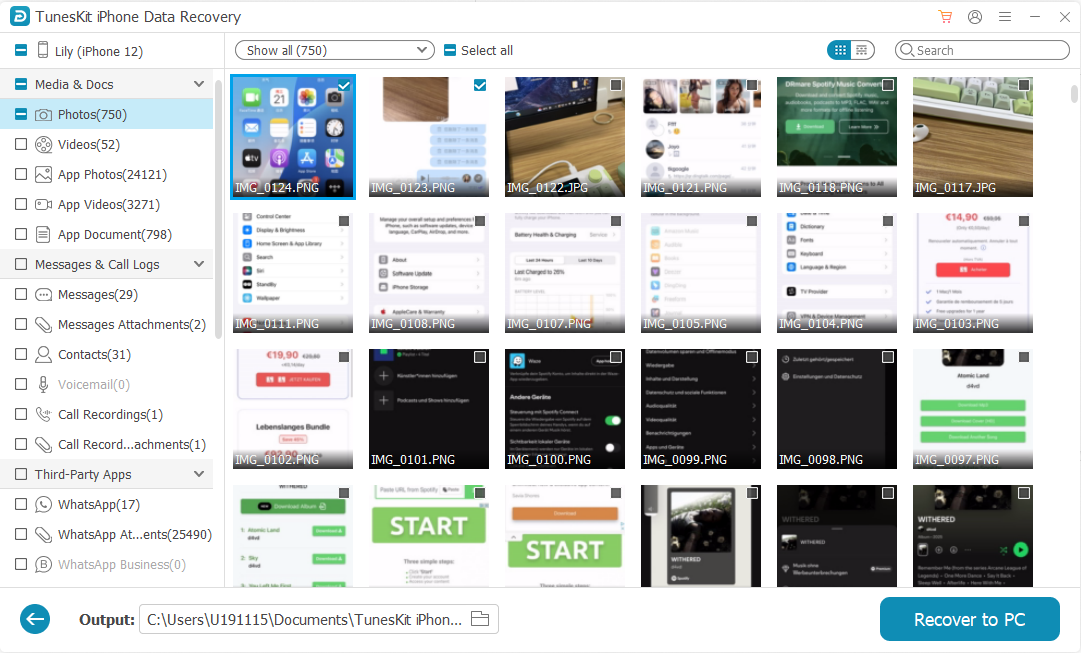
- Step 3. Once the deep scan is complete, preview the categorized results, select the specific photos, messages, or documents you want to restore, and click the "Recover to PC" button to save them directly to your computer.
 View Also:
 Conclusion
The final take on the 'Should I Jailbreak My iPhone?' question is that performing an iPhone jailbreak is a risky move considering its pros and cons. Hence it is highly advisable that you only do that if you clearly understand its merits and shortcomings. Otherwise, the final decision is yours. Do what is right for you.