


Locked vs Unlocked iPhone: What's the Difference & How to Check
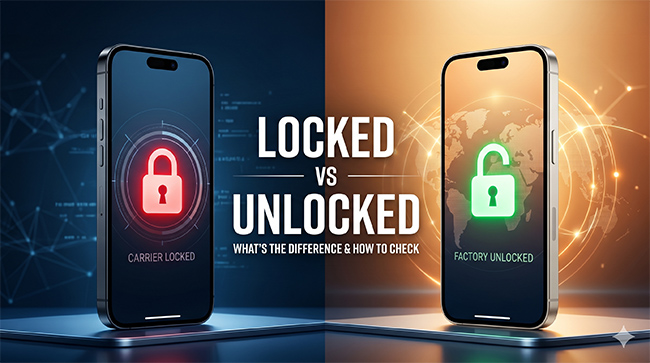
When purchasing a new or used device, the choice between a locked vs unlocked iPhone is one of the most significant decisions you will make. This choice directly impacts your wallet, your future mobile network plans, and how easily you can travel abroad. It is essential to understand exactly what these terms mean before handing over your money. This guide will break down everything you need to know to make the right purchasing decision.
- At a Glance: Comparison of Locked and Unlocked iPhone
- The Core Difference Between Locked and Unlocked iPhone
- How to Check Your iPhone's Status Right Now
- Pros and Cons: Which Should You Buy?
- Can You Unlock a Carrier-Locked iPhone?
- Beyond Carrier Restrictions: What If Your Screen Is Locked?HOT
- Conclusion
At a Glance: Comparison of Locked and Unlocked iPhone
| Feature | Locked iPhone | Unlocked iPhone |
|---|---|---|
| Network Compatibility | Restricted to a single specific mobile carrier (e.g., AT&T, Verizon, T-Mobile). | Fully compatible with any supported mobile carrier worldwide. |
| Upfront Cost | Generally lower; often heavily subsidized by the carrier. | Generally higher; purchased at full retail price. |
| Payment Structure | Usually tied to a 24- or 36-month installment plan or carrier contract. | Typically paid in full upfront at the time of purchase. |
| Switching Providers | Not possible until the device is fully paid off and unlocked by the carrier. | Complete freedom; switch to any better or cheaper network at any time. |
| International Travel | Subject to expensive daily roaming fees; cannot use foreign SIMs. | Travel-friendly; easily activate cheap local physical SIMs or eSIMs abroad. |
| Resale Value | Lower; potential buyers are limited to those using that exact same network. | Higher; appeals to a much broader global market of buyers. |
| Out-of-the-Box Setup | May require activation through a specific carrier portal. | Ready to use immediately with any active SIM card. |
The Core Difference Between Locked and Unlocked iPhone
The primary difference between these two types of devices comes down to cellular network software restrictions.
A carrier-locked iPhone contains a software block that forces the device to only connect to a specific mobile provider, such as AT&T or Verizon. Mobile carriers do this because they often subsidize the initial cost of the device, and the lock ensures you remain a paying customer on their network until the phone is fully paid off.
A factory-unlocked iPhone has no such software restrictions right out of the box. You have the ultimate freedom to insert a physical SIM card or activate an eSIM from virtually any compatible carrier worldwide. These devices are typically purchased at full retail price directly from Apple or a certified third-party retailer.
How to Check Your iPhone's Status Right Now
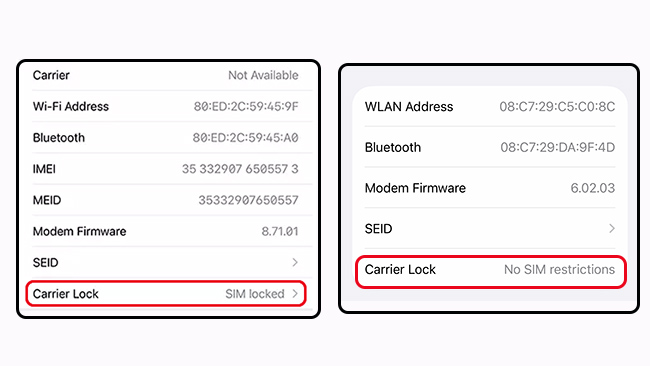
Before you try to switch carriers or buy a used device, you need to verify its current network status. Apple has made this incredibly simple in recent iOS updates. You do not need any special technical skills to check if your iPhone is locked or not.
Method 1. Check via iPhone Settings
This is the fastest and most reliable way to check your status without needing any physical accessories.
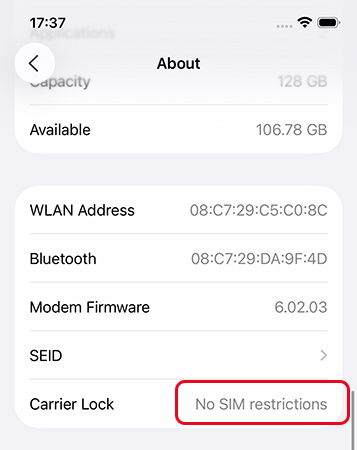
- Step 1. Open the Settings app on your iPhone and tap on General.
- Step 2. Tap on About at the top of the screen and scroll down until you see the Carrier Lock section.
- Step 3. Check the text next to Carrier Lock section. If it says "No SIM restrictions," your iPhone is fully unlocked and ready for any network.
Method 2. Check via Physical SIM Swap
If you are running an older version of iOS, testing a different SIM card is a good method.
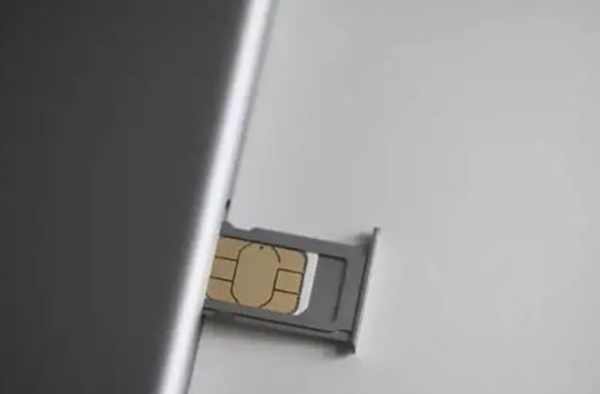
- Step 1. Power down your iPhone completely and remove your current SIM card using a SIM ejector tool.
- Step 2. Insert a SIM card from a completely different mobile carrier and turn the device back on.
- Step 3. Try to make a phone call or browse the web without Wi-Fi. If the device connects to the network successfully, your phone is an unlocked one.
Pros and Cons: Which Should You Buy?
Making the right purchasing decision depends entirely on your upfront budget and long-term mobile needs. Both options have distinct advantages depending on your situation.
The Advantages of an Unlocked iPhone
- Travel freedom: You can easily swap to cheap local eSIMs or physical SIM cards when traveling internationally to avoid expensive roaming charges.
- Higher resale value: Unlocked devices are universally compatible, making them much easier to sell quickly on the second-hand market.
The Advantages of a Locked iPhone
- Lower upfront cost: Carriers often subsidize the cost of the phone or offer zero-interest installment plans, making it highly affordable on day one.
- Promotional deals: Network providers frequently offer massive discounts or free device upgrades if you agree to stay locked to their network for a set period.
Can You Unlock a Carrier-Locked iPhone?
If you discover that your current device is restricted to a single network, you are not necessarily stuck forever. You can legally unlock a carrier-locked iPhone, provided you meet your specific network's internal requirements.
To get your device unlocked from a carrier, you must contact them directly. As a general rule, the device must be entirely paid off, your account must be in good standing, and any contract terms must be completely fulfilled. Be cautious of third-party network unlocking software, as circumventing a carrier lock without permission violates your terms of service.
Beyond Carrier Restrictions: What If Your Screen Is Locked?
While a carrier lock stops you from switching networks, what happens if you cannot even get past your lock screen? Forgetting your screen passcode or buying a second-hand device stuck on an iCloud Activation Lock is a completely different kind of restriction that requires a different solution.
In these situations, a dedicated software tool like TunesKit iPhone Unlocker is incredibly valuable. This desktop program is designed specifically to help users bypass device-level security barriers rather than network-level carrier locks.
- Removing 4-digit and 6-digit screen passcodes, as well as biometric locks like Face ID and Touch ID.
- Deleting Mobile Device Management (MDM) profiles and Screen Time limits securely.

If you are dealing with a disabled screen, forgotten credentials, or strict device management profiles, TunesKit iPhone Unlocker provides a straightforward process to regain full access to your iPhone.
Conclusion
Ultimately, deciding between a locked vs unlocked iPhone depends entirely on your budget and lifestyle. If you value the freedom to chase the best mobile plans and travel internationally with ease, saving up to buy an unlocked phone outright is the smartest choice. Conversely, if you want the latest technology right now and prefer to spread out the cost, accepting a carrier lock in exchange for a favorable installment plan is perfectly reasonable.
By the way, if you are locked out of your iPhone by iPhone screen lock, whether your iPhone is a locked iPhone or an unlocked iPhone, you can use TunesKit iPhone Unlocker to unlock it with a few clicks.


