UnlockMaker Review 2026: Is It Legit, Safe, Free, or a Scam?

UnlockMaker claims to offer free online services for removing Activation Lock, carrier restrictions, and IMEI blacklist issues. But many users still search for UnlockMaker reviews to find out whether it really works, whether it is truly free, and whether it is safe.
For this review, we checked UnlockMaker's current website, Terms of Service, Privacy Policy, user feedback, and Apple's official guidance to see what can actually be verified.
The main concern is not simply negative reviews. Several important claims on UnlockMaker's website appear inconsistent, especially regarding fees, proof of ownership, processing time, and Activation Lock removal.
| Question | Verdict |
|---|---|
| Is UnlockMaker free? | ⚠️ It says yes, but third-party verification fees may apply. |
| Does UnlockMaker work? | ❓ Its server-level removal claim is not independently verified. |
| Is UnlockMaker legit? | ⚠️ The site is active, but some claims conflict with its own Terms. |
| Is UnlockMaker safe? | ⚠️ It may collect sensitive device and identity information. |
| Is it affiliated with Apple? | ❌ No. |
| Should you use it? | ⚠️ Proceed cautiously and try Apple's official options first. |
- What Is UnlockMaker?
- Does UnlockMaker Really Remove Activation Lock?
- Is UnlockMaker Really Free?
- Is UnlockMaker Legit and Safe?
- 4 Red Flags to Know Before Using UnlockMaker
- UnlockMaker Reviews: What Do Real Users Say?
- UnlockMaker Pros and Cons
- Before Using UnlockMaker: Try Apple's Official Activation Lock Options
- A Desktop Alternative to UnlockMaker: TunesKit iPhone Unlocker HOT
- FAQs About UnlockMaker
- Final Verdict
What Is UnlockMaker?
UnlockMaker is a web-based device unlocking service. Its current website promotes three main services:
- iCloud Activation Lock removal;
- carrier or SIM unlocking;
- IMEI blacklist removal.
The website currently describes these services as free and says its Activation Lock service works with current iOS versions and multiple Apple devices. It also claims that Activation Lock can be removed remotely through a server-level process.
UnlockMaker at a Glance
| Item | Details |
|---|---|
| Service type | Online unlocking service |
| Software required | No |
| Activation Lock removal | Claimed |
| Carrier unlock | Claimed |
| IMEI blacklist removal | Claimed |
| Advertised price | Free |
| Apple affiliation | No |
| Ownership verification | May be required |
Does UnlockMaker Really Remove Activation Lock?
UnlockMaker says it can permanently remove Activation Lock through a server-level process without the Apple Account password.
Apple, however, officially recommends removing Activation Lock by:
- entering the linked Apple Account and password;
- asking the previous owner to remove the device from Find My;
- submitting an Activation Lock support request with proof of purchase.
Apple does not list UnlockMaker as an authorized Activation Lock removal provider. More importantly, UnlockMaker's own Terms state that it is not affiliated with Apple and cannot access or reset Activation Lock. That does not clearly match its homepage claim of server-level removal.
Verdict: UnlockMaker claims to remove Activation Lock remotely, but this claim cannot be independently verified from Apple documentation or UnlockMaker's own legal pages.
Is UnlockMaker Really Free?
On its official website, UnlockMaker currently advertises 100% free service, no hidden fees, and no credit card required.
However, its Terms say that a third-party verification provider may charge fees and that UnlockMaker may receive a commission from that process. Its Privacy Policy also mentions payment information being handled by a third-party partner.
Verdict: The unlocking service is advertised as free, but the overall process may still involve third-party charges. Before entering payment information, check whether you are signing up for a paid or recurring service.
Is UnlockMaker Legit and Safe?
"Legit" and "safe" are related questions, but they are not the same thing.
Is UnlockMaker Legit?
UnlockMaker is an active website with Terms of Service, a Privacy Policy, contact information, and ownership requirements. However, having these pages does not prove that every unlocking claim works as advertised. The main issue is that several statements on the site conflict with each other.
Verdict: UnlockMaker appears to be an active online service, but its conflicting claims make it difficult to independently verify how reliable its unlocking service is.
Is UnlockMaker Safe to Use?
UnlockMaker says it encrypts personal data, limits internal access, and uses other security measures. However, its Privacy Policy also notes that no online transmission or storage method is completely secure.
The main concern is the amount of sensitive information it may collect, including:
- name, email, and phone number;
- IMEI, serial number, device model, and iOS version;
- purchase receipt and proof of ownership;
- government-issued ID;
- payment information handled by a third-party partner.
Some of this data may also be shared with a third-party verification provider for identity checks and payment processing.
Verdict: UnlockMaker is not automatically unsafe, but users should be cautious because the service may require sensitive identity and device information. Review its privacy terms carefully before submitting any documents or payment details.
4 Red Flags to Know Before Using UnlockMaker
Several statements on UnlockMaker's own website do not fully match each other. Here are the four biggest inconsistencies we found.
1. Free Service vs Third-Party Fees
The homepage says UnlockMaker is free and requires no credit card. However, its Terms state that a third-party verification provider may charge fees, and UnlockMaker may receive a commission from that process.
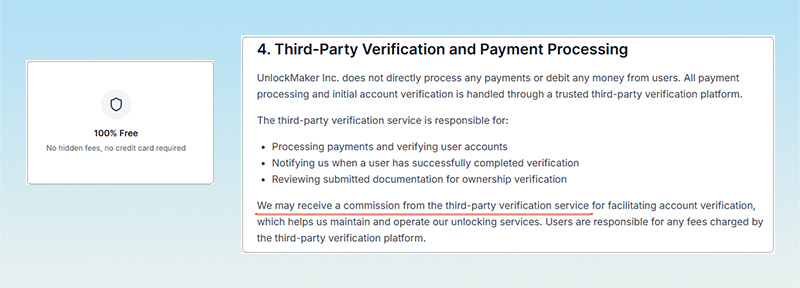
What users should do: Check all payment and subscription details before continuing.
2. Proof of Purchase: Required or Not?
UnlockMaker says its service is for verified owners, and its Terms may require a purchase receipt, government-issued ID, or other ownership proof. However, another part of the homepage says "no proof of purchase required."
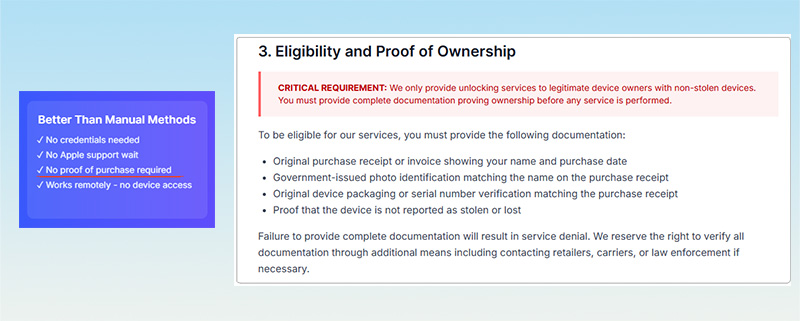
What users should do: Be prepared to provide ownership documents unless UnlockMaker confirms otherwise.
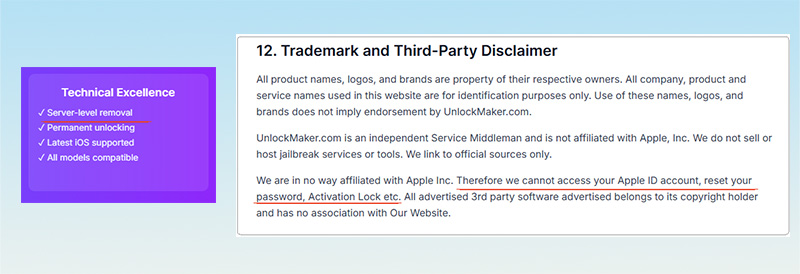
3. Server-Level Removal vs Its Disclaimer
UnlockMaker claims to remove Activation Lock permanently through Apple's activation infrastructure. Yet its Terms say the company is not affiliated with Apple and cannot access Apple Accounts or reset Activation Lock. This makes its exact unlocking process unclear.
4. Under 5 Minutes or 24–72 Hours?
UnlockMaker's homepage gives two different processing times. One section says unlocking takes less than 5 minutes, while another says most requests take 24–72 hours. The site does not clearly explain why the estimates differ.
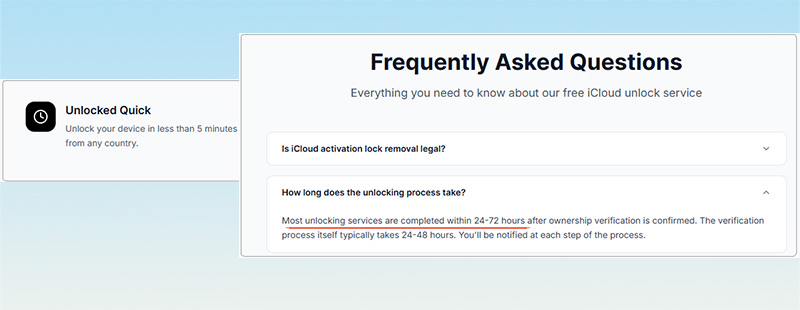
| Topic | UnlockMaker Claim | Other Information We Found |
|---|---|---|
| Cost | Completely free | Third-party verification fees may apply |
| Proof of purchase | Not required | Other sections may require ownership documents |
| Activation Lock | Permanent server-level removal | Terms say it cannot access or reset Activation Lock |
| Processing time | Under 5 minutes | Another section says 24–72 hours |
These inconsistencies do not prove that UnlockMaker is fraudulent, but they are good reasons to review its terms carefully before submitting personal information or payment details.
UnlockMaker Reviews: What Do Real Users Say?
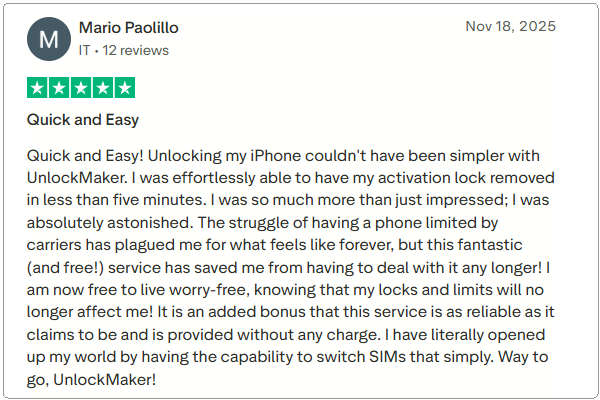
At the time of this review, UnlockMaker has a 2.1/5 TrustScore from 84 Trustpilot reviews, with most ratings being one star. The displayed rating distribution shows 83% one-star reviews and 14% five-star reviews.
Positive Feedback
Some reviewers report successful Activation Lock or carrier unlocking. For example, a 2025 five-star reviewer said the process was quick and free. That means it would be inaccurate to say that every public review is negative.
Common Complaints
Negative reviewers have reported issues such as:
- not receiving the expected unlocking result;
- unexpected charges or subscriptions;
- problems completing verification;
- being redirected through additional offers;
- difficulty getting useful support.
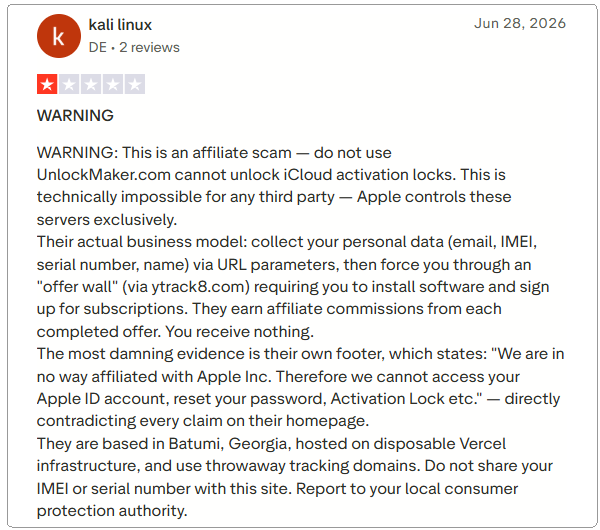
These reviews reflect individual user experiences and may not represent everyone's results. However, UnlockMaker's low Trustpilot score and the conflicting information on its own website are good reasons to be cautious before sharing personal or payment information.
UnlockMaker Pros and Cons
Here is a quick look at the main pros and cons of UnlockMaker to help you decide whether it is worth trying.
 Pros:
Pros:- No software installation required.
- Advertised as free.
- Offers several unlocking services.
- Publishes Terms and a Privacy Policy.
 Cons:
Cons:- Important information is inconsistent.
- Third-party fees may apply.
- Sensitive personal and device data may be required.
- Server-level removal claims are not independently verified.
- User reviews are mostly negative.
Before Using UnlockMaker: Try Apple's Official Activation Lock Options
Before sending your IMEI, receipt, or identity documents to any third-party unlocking service, use Apple's official methods whenever possible.
Option 1. Enter the Linked Apple Account
If you know the Apple Account associated with the iPhone or iPad, follow the Activation Lock screen and enter the account password. In supported situations, the device passcode may also be accepted.

Option 2. Ask the Previous Owner
If you bought a used iPhone and can contact the previous owner, ask them to remove it from their account through Find My feature on iCloud website. Once it is removed from the previous owner's account, Activation Lock can be cleared properly.

Option 3. Request Help from Apple
If you legitimately own the device and have proof of purchase, Apple provides an Activation Lock support request process.

These methods should be your first choice because they use Apple's official account and ownership systems.
A Desktop Alternative to UnlockMaker: TunesKit iPhone Unlocker
If Apple's official options are unavailable and you own the device or are authorized to manage the device, TunesKit iPhone Unlocker is another option for supported iPhones and iPads.
Unlike UnlockMaker's online service, TunesKit works as desktop software. You connect the device to a computer and follow the unlocking process directly in the program.
More importantly for this comparison, TunesKit publishes a clear compatibility limitation for Activation Lock removal. Its currently supports iPhone 5s through iPhone X running iOS 12.0 to iOS 16.7.15. It should therefore not be presented as a solution for every iPhone or the latest iOS version.
Why Consider TunesKit iPhone Unlocker?
Offers a straightforward desktop-based process with a dedicated Activation Lock removal mode and no jailbreak required. Avoids submitting your IMEI or government ID.
 600,000+ Downloads
How to Remove Activation Lock with TunesKit iPhone Unlocker
- Step 1. Install and launch TunesKit iPhone Unlocker, connect the device, and choose Remove iCloud Activation Lock.
- Step 2. Follow the onscreen instructions to place the device into Recovery Mode and then DFU Mode.
- Step 3. Start the removal process and keep the device connected until it finishes.

 Note
Note
Check device and iOS compatibility before using this feature.
FAQs About UnlockMaker
-
Is UnlockMaker a scam?
There is not enough verified evidence to definitively call UnlockMaker a scam. However, its website contains several inconsistencies, and independent user feedback is largely negative.
-
Does UnlockMaker really work?
UnlockMaker claims to remove Activation Lock remotely, but its server-level removal method has not been independently verified. Some online reviewers report success, while many others report unsuccessful results.
-
Is UnlockMaker really free?
UnlockMaker advertises its service as free, but its Terms state that third-party verification fees may apply.
-
Is UnlockMaker safe?
UnlockMaker may collect sensitive information such as your IMEI, serial number, receipt, and government ID. Review its privacy terms carefully before submitting anything.
-
Is UnlockMaker affiliated with Apple?
No. UnlockMaker states that it is an independent service and is not affiliated with Apple.
Final Verdict
Our UnlockMaker review found several inconsistencies between the service's marketing claims and its own Terms, particularly around pricing, ownership verification, and Activation Lock removal. This does not prove the service is fraudulent, but it gives users good reason to proceed carefully.
Try Apple's official Activation Lock options first. If they are unavailable and your device is compatible, TunesKit iPhone Unlocker provides a desktop-based alternative with clearly listed device and iOS requirements.