Passra1n Review: Features, Compatibility, Safety, and Pros & Cons

Passra1n is an interesting, free, and publicly documented project for a relatively narrow range of older Apple devices. However, its limited compatibility, beta status, reported cellular functionality restrictions, and lack of independent security verification mean that users should approach it cautiously.
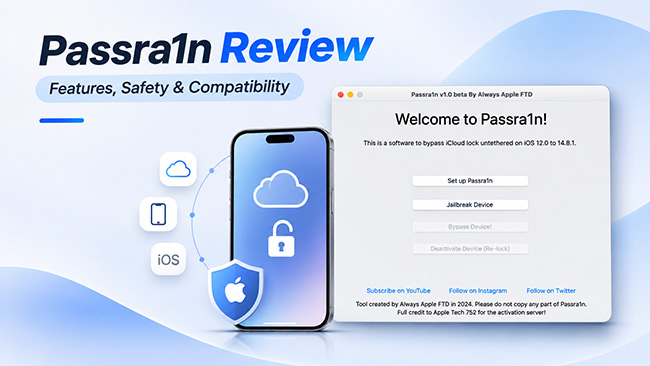
Passra1n is a free tool designed to bypass iCloud Activation Lock on selected older iPhones and iPads. It uses checkra1n technology and supports specific devices running iOS 12.0–14.8.1. But is Passra1n safe, reliable, and worth trying? In this review, we'll explore its features, compatibility, advantages, disadvantages, and potential risks to help you decide whether it meets your needs.
What Is Passra1n?
Passra1n is an application designed to bypass iCloud Activation Lock on certain compatible iPhones and iPads. Developed by Always Apple FTD, it uses checkra1n jailbreak technology as part of its technical process.
Activation Lock is an Apple security feature that helps prevent unauthorized people from using lost or stolen devices. It is associated with the Apple Account of the original owner and is normally activated through Find My. Passra1n is intended to address this restriction through a technical bypass rather than the standard Apple account recovery process.
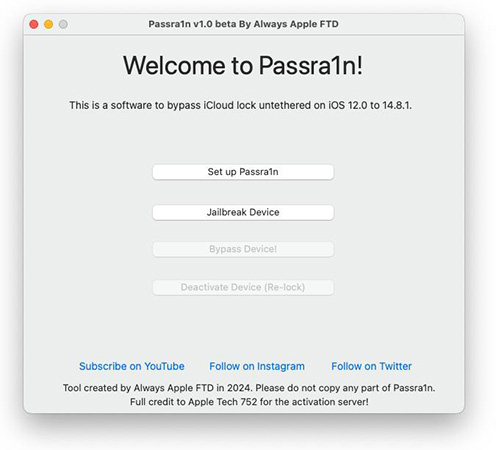
Who Developed Passra1n?
Passra1n is associated with Always Apple FTD, which publishes its software information and project documentation online. One notable aspect of the project is its public GitHub repository. This allows technically experienced users to inspect the available source code rather than relying exclusively on promotional descriptions. However, public source code does not automatically establish that the software is secure, actively maintained, or independently verified.
What Is Passra1n Used For?
Passra1n is primarily marketed toward people dealing with Activation Lock on older compatible Apple devices. Its advertised functionality includes:
- Working with selected checkm8-compatible Apple devices.
- Integrating checkra1n into its workflow.
- Providing an application-based interface.
- Offering an advertised untethered bypass.
- Making its project source code publicly accessible.
It is important to understand that jailbreaking and Activation Lock removal are different processes. Jailbreaking modifies the operating system to provide additional access, while Activation Lock is an account-based security mechanism. Passra1n combines jailbreak-related technology with its advertised Activation Lock bypass functionality.
Passra1n Compatibility: Supported Devices and iOS Versions
Compatibility is one of the most important considerations when evaluating Passra1n. The software is not designed for every iPhone or iPad. Its documented compatibility is limited to selected older Apple devices that support the checkm8 exploit and meet the applicable firmware requirements.
Supported iPhone Models
According to the developer's documentation, supported iPhone models include:
- iPhone 5s
- iPhone 6 and 6 Plus
- iPhone 6s and 6s Plus
- iPhone SE (1st generation)
- iPhone 7 and 7 Plus
- iPhone 8 and 8 Plus
- iPhone X
Supported iPads and iPod Touch
The developer also lists selected iPads and an iPod touch model. These include:
- Selected iPad Pro models.
- Fifth-generation iPad.
- Sixth-generation iPad.
- Seventh-generation iPad.
- Seventh-generation iPod touch.
Because compatibility can depend on the specific hardware configuration, users should check the developer's official device list before assuming that a particular model will work.
Supported iOS Versions
Passra1n's published compatibility information identifies an advertised firmware range of iOS 12.0 through 14.8.1.
| Requirement | Published information |
|---|---|
| Firmware range | iOS 12.0–14.8.1 |
| Hardware | Selected checkm8-compatible devices |
| Computer platform | macOS |
| Jailbreak technology | checkra1n |
| Device compatibility | Limited to documented models |
Does Passra1n Work on Windows?
Passra1n is documented as a macOS application. Its published requirements do not establish native Windows compatibility. Therefore, Windows users should not assume they can run the application directly on their computers. Similarly, compatibility with modern macOS releases and Apple Silicon computers should be independently confirmed before attempting to use the software.
Key Features of Passra1n
Passra1n offers several features that may attract people looking for an Activation Lock bypass tool. However, it is important to distinguish between documented software characteristics and independently verified performance.
1. Free Availability
One of Passra1n's main attractions is that it is advertised as free software. This makes it potentially interesting to users who do not want to pay for commercial third-party unlocking applications. However, free availability does not mean that it is risk-free. Users should still consider its technical requirements, compatibility restrictions, and security implications.
2. Integration With checkra1n
Passra1n incorporates checkra1n into its workflow. checkra1n is a jailbreak utility based on the checkm8 bootrom exploit, which affects certain Apple devices using compatible processors. Integrating this technology means that Passra1n builds on an existing jailbreak framework rather than implementing every underlying component independently. It is worth emphasizing that checkra1n itself is not an Activation Lock removal tool. Its role in this context is related to the jailbreak functionality used by Passra1n.
3. Advertised Untethered Bypass
The developer describes Passra1n as providing an untethered bypass. In general, an untethered jailbreak or bypass is intended to remain functional after the device restarts without requiring the entire process to be repeated using a computer. This is potentially convenient for users who do not want to reconnect their devices after every restart. Nevertheless, the advertised behavior should not be treated as an independently verified guarantee for every supported device.
4. Open-Source Availability
Another notable feature is the availability of Passra1n's source code through GitHub. Open-source availability offers several potential advantages:
- Developers can examine the published implementation.
- Technically experienced users can review the project.
- Changes and development activity can be tracked.
- Issues can be reported through the project's repository.
However, source-code availability should not be confused with a professional security audit. Users should also remember that inspecting source code and verifying that a downloadable application matches that source code are two different tasks.
How Does Passra1n Work?
Passra1n uses checkra1n jailbreak technology to perform its advertised Activation Lock bypass on compatible Apple devices. Its documented process involves accessing the device's filesystem and modifying activation-related configurations.
The general workflow includes:
- 1. Check compatibility: Confirm that your iPhone or iPad meets the supported hardware and iOS requirements.
- 2. Prepare the device: Connect the compatible device to a Mac and ensure the required software components are available.
- 3. Jailbreak integration: Passra1n uses checkra1n as part of its technical process.
- 4. Activation processing: The application performs the documented filesystem and activation-related operations.
- 5. Check functionality: Verify the device's resulting functionality and understand any remaining limitations.
Is Passra1n Safe and Legit?
Safety and legitimacy are important questions when evaluating any third-party software that interacts with Apple's security mechanisms. Passra1n has several identifiable public development resources, but the available evidence does not justify describing it as completely safe or independently verified.
Is Passra1n Legit?
Passra1n appears to be an identifiable software project with an associated developer, an official website, a public GitHub repository, technical documentation, and published release information. These resources provide some transparency about the project and allow users to learn more about how the software is developed.
However, these factors do not guarantee that Passra1n will work as advertised or that every copy available online is authentic. Users should therefore verify the download source and avoid unofficial versions.
Is Passra1n Free From Malware?
There is currently insufficient independent security evidence to confirm that Passra1n is completely malware-free. While its public GitHub repository provides some transparency, source-code availability is not a substitute for an independent security or malware analysis.
For greater safety, download the software only from the developer's documented sources and avoid modified versions from third-party websites. Users should also avoid entering Apple Account passwords into unverified applications, back up important data beforehand, and exercise caution when using any third-party tool that modifies device software.
Potential Device Risks
Software that modifies device behavior or interacts with system files can introduce technical risks. With Passra1n, users may encounter unexpected software errors, failed activation-related operations, or situations where the device needs to be restored. Some device functions may also remain unavailable, and compatibility issues could occur after software updates.
The developer's documentation also describes the project as a work in progress. Therefore, users should not expect the same level of reliability as an officially supported Apple service.
Apple's Official Activation Lock Recovery Options
For people who legitimately own a locked iPhone or iPad, Apple's official recovery methods are generally the most appropriate starting point. Depending on the circumstances, these may include:
- 1. Entering the Apple Account credentials previously associated with the device.
- 2. Asking the previous owner to remove the device from their account.
- 3. Recovering access to the associated Apple Account.
- 4. Contacting Apple Support with valid proof of purchase when eligible.
These options address the underlying ownership and account authorization requirements rather than relying on an unofficial technical workaround.
 Further Reading: How to Turn Off Activation Lock on iPhone(Complete 2026 Guide)
Passra1n Pros and Cons
Passra1n offers several useful features, but its compatibility and functionality limitations are worth considering.
 Pros:
- Free to use: Advertised as free software.
- checkra1n integration: Incorporates an established jailbreak utility.
- Open-source: Publicly available source code.
- Device support: Works with selected older iPhones and iPads.
 Cons:
- Limited compatibility: Supports specific devices and iOS versions.
- Mac required: No confirmed native Windows support.
- Technical complexity: Requires some technical knowledge.
- Cellular limitations: The original release documentation reports no cellular signal after bypassing.
- Uncertain reliability: Beta status and limited independent testing.
Overall, Passra1n offers an interesting free solution, but its limitations may outweigh its benefits for many users.
Passra1n Alternative: TunesKit iPhone Unlocker
If Passra1n does not meet your requirements, TunesKit iPhone Unlocker is another option worth considering. It offers an Activation Lock removal feature for selected iPhones and iPads. Unlike Passra1n, its newer version introduces a jailbreak-free Activation Lock removal method for supported iPhone 6s through iPhone X models running iOS 12.0–16.7.15.
Key Features of TunesKit iPhone Unlocker
- Jailbreak-free option: Supports Activation Lock removal without jailbreaking on eligible devices.
- Windows and macOS support: Available for both operating systems.
- Multiple unlocking features: Also supports screen passcode, Apple ID, MDM, and Screen Time removal under supported conditions.
- Guided interface: Provides an on-screen process to help users complete the required steps.
How to Use TunesKit iPhone Unlocker
- Step 1. Get TunesKit iPhone Unlocker from its official website and install it on your computer. Launch the software and connect your compatible iPhone or iPad.
- Step 2. Choose the Remove iCloud Activation Lock option. Complete the on-screen steps according to your device and iOS version.

- Step 3. Follow the software's prompts to verify whether the supported operation is completed successfully.
Passra1n vs. TunesKit iPhone Unlocker
| Feature | Passra1n | TunesKit iPhone Unlocker |
|---|---|---|
| Pricing | Free | Paid |
| Windows support | Not confirmed | Yes |
| macOS support | Yes | Yes |
| Jailbreak-free Activation Lock removal | No | Yes, on eligible devices |
| Additional unlocking features | Limited | Multiple |
Overall, TunesKit iPhone Unlocker offers a more flexible alternative, particularly for users who prefer a Windows-compatible solution or want to avoid jailbreaking on supported devices. However, compatibility and functionality depend on the exact device and iOS version. Check the official requirements before purchasing.
Final Verdict
Passra1n is a free, publicly documented project with limited compatibility and several important drawbacks, including its macOS requirement, reported cellular limitations, and uncertain maintenance status. It may suit technically experienced users with compatible older devices, but it is not a universal solution.
For users looking for a more accessible alternative, TunesKit iPhone Unlocker offers support for Windows and macOS and provides a jailbreak-free Activation Lock removal option for certain supported devices. However, compatibility and features vary by device and iOS version, so check the official requirements before using either tool.