iUnlocker Review 2026: Is It Legit, Safe & Does It Work?

iUnlocker is an active web-based device checking and unlocking service with public pricing and customer reviews. However, whether an iCloud removal request works depends heavily on your device model, iCloud status, carrier, country, and the specific service you choose. Some iUnlocker services advertise success ratios of 75%–100%, but these figures are provided by iUnlocker itself rather than independently verified.
If you search for an online iCloud unlock or IMEI check service, iUnlocker is one of the names you may come across. But is iUnlocker legit? Does it really remove Activation Lock, and how much does it cost?
As of 2026, iUnlocker offers much more than iCloud removal. Its services include IMEI checks, carrier and SIM-lock checks, blacklist checks, GSX information, and several remote unlocking options. This iUnlocker review examines its current services, prices, user feedback, limitations, and alternatives so you can decide whether it fits your device.

iUnlocker Review at a Glance
| Item | Details |
|---|---|
| Service Type | Online IMEI checking and device unlocking service |
| Software Installation | Usually not required for IMEI-based services |
| iCloud Activation Lock Removal | Available for eligible devices |
| IMEI / Serial Number Check | Yes |
| Carrier / SIM Lock Check | Yes |
| Blacklist Check | Yes |
| Carrier Unlock | Available for selected carriers/devices |
| Price | Varies significantly by service |
| Processing Time | Instant checks to several weeks |
| Official Apple Service | No |
| Best For | Device checks and eligible remote unlocking requests |
iUnlocker currently lists Apple IMEI checks, iCloud-status checks, carrier/SIM-lock checks, GSMA blacklist checks, GSX-related checks, carrier unlocking, and iCloud/Apple ID removal services.
What Is iUnlocker and What Does It Do?
iUnlocker.com is a web-based service that provides information about smartphones and offers several paid unlocking services. Instead of functioning as traditional desktop unlocking software, many iUnlocker services work by asking you to enter an IMEI or serial number and submit an online order.
This distinction matters because iUnlocker is not simply an "iCloud bypass tool." Its current website provides several separate services, and an IMEI check does not automatically remove Activation Lock.

Main iUnlocker Services
Some of the main services currently listed by iUnlocker include:
| iUnlocker Service | What It Does |
|---|---|
| Basic IMEI/SN Check | Displays basic information about a device |
| iCloud CLEAN/LOST Check | Checks the device's current iCloud status |
| Carrier & SIMLock Check | Identifies carrier and SIM-lock status |
| GSMA Blacklist Check | Checks whether a device is blacklisted |
| GSX / Sold By Check | Provides sales, replacement, repair, or policy information |
| MDM Lock Check | Checks the MDM status of supported Apple devices |
| Carrier Unlock | Removes eligible SIM/carrier restrictions |
| iCloud Removal | Attempts to remove Activation Lock on eligible devices |
How Does iUnlocker Work?
The exact process depends on the service you select. For a typical device check or remote unlock request:
- Step 1. Visit iUnlocker and select the service you need.
- Step 2. Enter your iPhone's IMEI or serial number.
- Step 3. Check the device information and eligibility requirements carefully.
- Step 4. If you choose a paid service, submit your order and payment.
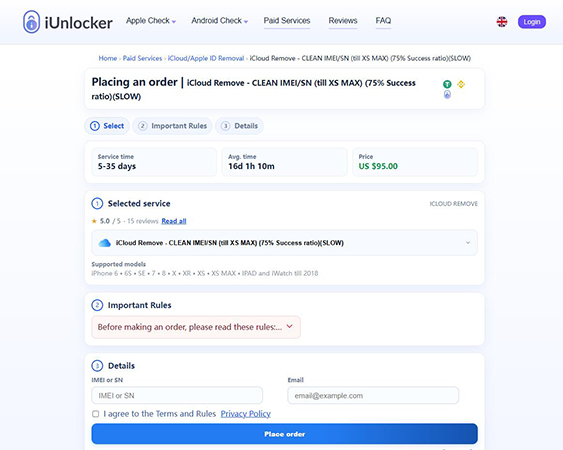
- Step 5. Wait for the result within the estimated service period.
Before paying, make sure you are ordering the correct service. For example, iUnlocker's Carrier and SIMLock Check specifically states that it only checks SIM-lock status and does not remove SIM lock or iCloud Activation Lock.
Does iUnlocker Really Work?
The answer depends on what you are using iUnlocker for.
Its IMEI and device-status services mainly retrieve information about a device, while services such as carrier unlock and iCloud removal depend on stricter eligibility requirements. For Activation Lock removal, iUnlocker currently lists different success ratios for different services. For example:
- Some CLEAN IMEI/SN removal services advertise a 75% success ratio.
- A U.S.-only CLEAN IMEI/SN service currently advertises an 85% success ratio.
- Certain highly specific device services may display a 100% success ratio.
These percentages are iUnlocker's own service claims, so they should not be treated as independent success-rate testing.
Eligibility can also be complicated. Some services only support CLEAN devices, certain countries, certain carriers, or specific device generations. Lost Mode devices may be excluded from some iCloud removal services.
Is iUnlocker Legit and Safe?
Before using any third-party unlocking service, it’s reasonable to ask: Is iUnlocker legit and safe? In this section, we’ll look at its service model, customer feedback, privacy considerations, and potential limitations to help you assess its reliability.
Is iUnlocker Legit?
iUnlocker is an operating commercial website with public service pages, pricing, order tracking, contact information, and customer reviews. It also has a profile on Trustpilot.
As of September 2026, Trustpilot shows iUnlocker with approximately 4.5/5 from 280 reviews. However, these reviews cover multiple services, including SIM unlocking and device checks, not only Activation Lock removal. Therefore, the presence of reviews can help confirm that real customers have used the service, but it does not guarantee that a particular unlock request will succeed.
Is iUnlocker Safe?
Many iUnlocker services are browser-based, so you usually do not need to install desktop software simply to run an IMEI check. You may, however, need to provide:
- IMEI
- Serial number
- Email address
- Payment information
- Device-related information required by a particular service
Before purchasing, review the service rules, privacy policy, cancellation terms, and refund conditions.
It is also worth noting that iUnlocker is an independent third-party service and is not part of Apple. Apple's official Activation Lock procedures remain the preferred first option when they are available.
How Much Does iUnlocker Cost in 2026?
There is no single "iUnlocker price." The cost depends on the device and service. Here are several examples available at the time of writing:
| Service | Listed Price | Estimated Time |
|---|---|---|
| Basic IMEI/SN Check | About $1.50 | 1–10 minutes |
| Carrier & SIMLock Check | About $1.70 | 1–10 minutes |
| GSX + Sold By Check | About $4.10 | 1–10 minutes |
| iCloud Remove up to iPhone XS Max | $95 | 5–35 days |
| iCloud Remove for iPhone 15 Series | $140 | 5–35 days |
| iCloud Remove for iPhone 16 Series | $170 | 5–35 days |
| U.S.-only CLEAN IMEI/SN Removal | $215 | 3–18 days |
 Note
Note
Prices, availability, and supported devices can change. Check the current iUnlocker service page before paying.
What Do Real iUnlocker Reviews Say?
User feedback is especially useful for evaluating an online unlocking service, but it is important to distinguish between reviews hosted by iUnlocker itself and reviews hosted by a third party.
Reviews on iUnlocker.com
iUnlocker's own review page currently displays a rating of approximately 4.8/5 based on more than 2,800 verified-order reviews. Those reviews cover multiple services such as carrier checks, iCloud checks, GSX checks, and unlocking services. For the specific CLEAN iCloud Removal category, the website currently shows hundreds of reviews and a rating around 4.8/5.
iUnlocker Reviews on Trustpilot
Trustpilot currently shows approximately:
- 4.5/5 TrustScore
- 280 total reviews
- Positive comments about successful carrier unlocks, response times, and refunds
- Some negative feedback concerning device-status results or unsuccessful services
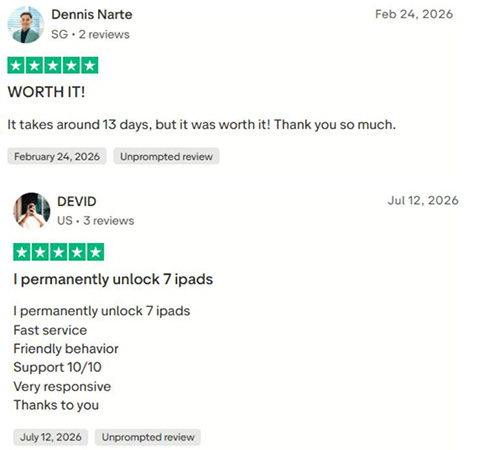
One important limitation is that Trustpilot reviews also cover many different iUnlocker services. A positive SIM unlock review does not prove the same result for an Activation Lock removal request. For that reason, check reviews related specifically to the service you plan to purchase.
iUnlocker Pros and Cons
 Pros:
Pros:- No desktop installation is required for most IMEI-based checks.
- Offers a wide range of Apple device information services.
- Pricing and estimated processing times are shown before ordering.
- Supports IMEI, iCloud, carrier, blacklist, GSX, and related checks.
- Some services provide refunds when an eligible unlock cannot be completed, subject to their specific rules.
- Independent customer feedback is available on Trustpilot.
 Cons:
Cons:- iCloud removal eligibility can be complicated.
- Prices for some removal services exceed $100–$200.
- Some services may take several weeks.
- Advertised success ratios are provided by iUnlocker rather than independent testing.
- Lost Mode, country, carrier, sales channel, or device-status restrictions may apply.
- You must choose the correct service before paying.
Try Apple's Official Activation Lock Options First
 Further Reading: How to Turn Off Activation Lock on iPhone(Complete 2026 Guide)
Before paying for a third-party Activation Lock service, check whether Apple's official methods can solve the problem. Apple currently recommends the following options:
1. Enter the Apple Account and Password Linked to the Device
You may also be able to use the device passcode when the Activation Lock screen provides that option.
2. Ask the Previous Owner to Remove the Device Remotely
They can sign in to iCloud.com/find, select the device, and choose Remove.
3. Submit an Activation Lock Support Request
If you own the device and have valid proof of purchase, Apple allows you to start an Activation Lock support request.
For a second-hand iPhone, Apple also recommends that buyers avoid taking ownership until the previous owner's account has been removed from the device.
These official options should be checked first because they preserve Apple's intended ownership and security process.
iUnlocker Alternative: TunesKit iPhone Unlocker
If iUnlocker's remote service does not fit your device and you own or are authorized to access the device, a desktop-based solution provides a different approach.
TunesKit iPhone Unlocker includes a Remove iCloud Activation Lock feature for supported older iPhone, iPad, and iPod touch models. Unlike iUnlocker, which mainly processes device information or remote service requests online, TunesKit runs locally on a Windows PC or Mac and guides you through the process.
A key point should be stated clearly here: while the overall TunesKit iPhone Unlocker supports newer iOS versions for other unlocking features, its Remove iCloud Activation Lock feature currently supports iOS 12.0–16.7.15 and selected older devices, including supported iPhones from the iPhone 5s through iPhone X.
iUnlocker vs TunesKit iPhone Unlocker
| Feature | iUnlocker | TunesKit iPhone Unlocker |
|---|---|---|
| Type | Online service | Desktop software |
| Requires Computer | Not for most remote services | Yes |
| IMEI/SN Checks | Yes | No |
| Activation Lock Removal | Eligible online services | Supported devices |
| Processing | Can take days or weeks | Guided software process |
| Device Eligibility | Depends on service | Depends on hardware/iOS |
| Newer iPhones | Some online services available | Activation Lock feature limited to older devices |
| Best Use Case | Remote checking/unlock requests | Supported older iOS devices in your possession |
How to Remove Activation Lock with TunesKit on a Supported Device
- Step 1. Install TunesKit iPhone Unlocker on your computer, launch it, connect your device, and choose Remove iCloud Activation Lock.
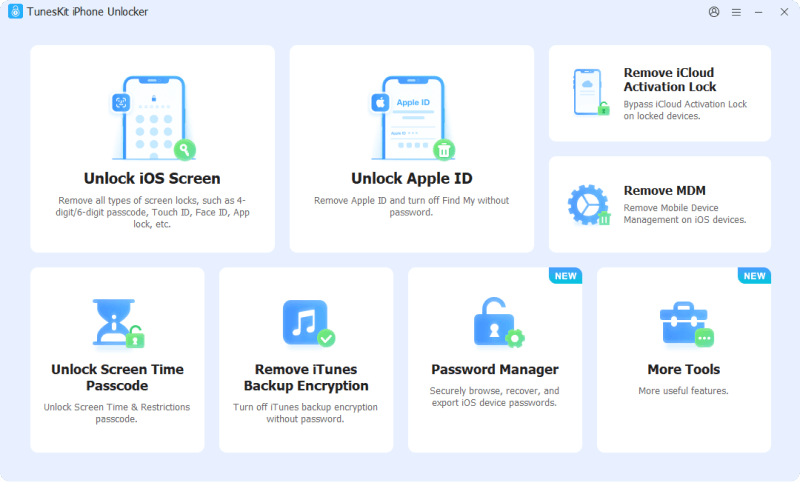
- Step 2. The program provides instructions for preparing supported devices. The exact procedure varies by operating system and iOS version.
- Step 3. After confirming that your device and iOS version are supported, follow the on-screen instructions to complete the removal process.
FAQs About iUnlocker
-
Can iUnlocker unlock a Lost Mode iPhone?
Not necessarily. Some of iUnlocker's current iCloud removal services explicitly exclude devices in Lost Mode. Check the eligibility rules before ordering.
-
Is iUnlocker the same as an iCloud bypass tool?
No. iUnlocker provides many services besides Activation Lock removal, including IMEI checks, iCloud-status checks, carrier checks, blacklist checks, GSX checks, and SIM unlocking.
-
What should I do before paying for iUnlocker?
Check the device's IMEI, iCloud CLEAN/LOST status, model, carrier, country, and the exact rules of the selected service. This can help prevent ordering a service that does not support your device.
Conclusion
iUnlocker is more than an iCloud unlock website: it offers IMEI checks, carrier information, blacklist checks, SIM unlocking, and several Activation Lock services. Its main advantage is the web-based workflow, while pricing, processing time, and eligibility vary considerably between services.
Before paying, check the exact device requirements and try Apple's official Activation Lock options first. For supported older devices, TunesKit iPhone Unlocker offers a desktop-based alternative if you prefer to handle the process locally.