Broque Ramdisk Pro Review 2026: Is It Safe, Free & Does It Work?

Broque Ramdisk Pro is a popular name among users looking for an Activation Lock bypass tool for older iPhones and iPads. It is often described as a free ramdisk-based utility that can bypass the activation screen on certain devices.
But is Broque Ramdisk Pro safe? Does it really work? This Broque Ramdisk Pro review explains what the tool does, its compatibility, download and safety concerns, real user reports, common errors, and an easier alternative for supported devices.
Broque Ramdisk Pro can work on some older compatible iPhones and iPads, but it is better suited to experienced users familiar with DFU mode, ramdisk tools, and device compatibility. If you prefer a simpler guided solution, TunesKit iPhone Unlocker may be easier to use on supported devices.
- Broque Ramdisk Pro at a Glance
- What Is Broque Ramdisk Pro?
- Broque Ramdisk Pro Compatibility and Requirements
- Broque Ramdisk Pro Download: Is It Free and Safe?
- How to Use Broque Ramdisk Pro for Activation Lock Bypass
- Does Broque Ramdisk Pro Really Work?
- Pros and Cons of Broque Ramdisk Pro
- Common Broque Ramdisk Pro Errors and Fixes
- Easier Broque Ramdisk Pro Alternative: TunesKit iPhone Unlocker HOT
- Conclusion
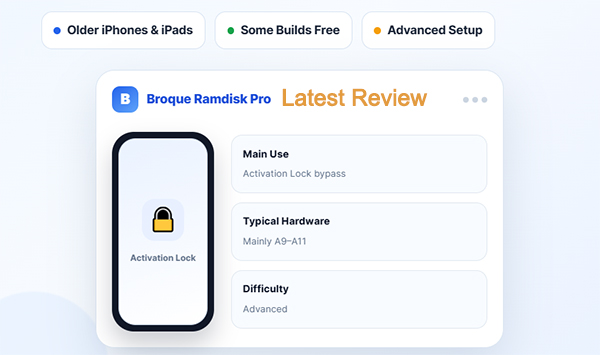
Broque Ramdisk Pro at a Glance
| Item | Answer |
|---|---|
| Main use | Activation Lock bypass |
| Best for | Older compatible iPhones/iPads |
| Typical hardware | Mainly A9–A11 workflows |
| Price | Some builds are free |
| Official latest version | Not clearly confirmed |
| Latest third-party listing found | v3.2.6 |
| Difficulty | Advanced |
| Cellular after bypass | May be unavailable |
What Is Broque Ramdisk Pro?
Broque Ramdisk Pro is an unofficial iPhone and iPad unlocking tool, mainly used to bypass Activation Lock on supported older devices.
It works by loading a temporary ramdisk into the device's memory. This gives the tool access to certain system-level functions without relying completely on the installed iOS system. That is why Broque Ramdisk Pro often requires the device to enter DFU Mode before it can start working.
Depending on the version and device, it may support features such as:
- bypassing Activation Lock;
- detecting device information;
- working with DFU Mode;
- loading ramdisk files;
- performing jailbreak-related operations.
Its features and supported devices can vary between versions, so always check the compatibility of the specific Broque Ramdisk Pro version before using it.
Broque Ramdisk Pro Compatibility and Requirements
Broque Ramdisk Pro mainly supports older iPhones and iPads. Compatibility can vary by version, so check your exact device and iOS version before using it.
Supported Devices
Commonly documented compatible models include:
- iPhone 6s / 6s Plus
- iPhone SE (1st generation)
- iPhone 7 / 7 Plus
- iPhone 8 / 8 Plus
- iPhone X
- selected older iPad models
These are mainly A9–A11 devices. Newer models such as the iPhone 11 are generally not supported by the traditional checkm8-based methods used with Broque Ramdisk Pro.
System Requirements
| Requirement | Details |
|---|---|
| Computer | Mainly Windows; some Mac versions are also available |
| USB connection | Required |
| DFU Mode | Usually required for ramdisk operations |
| Apple drivers | Required on Windows for device detection |
| Internet | May be required for registration or server-based features |
Because support differs between Broque versions and functions, do not rely only on a general iOS compatibility range. Always confirm that your specific iPhone or iPad model, iOS version, and intended function are supported.
Broque Ramdisk Pro Download: Is It Free and Safe?
Broque Ramdisk Pro does not have one clear official download page that lists every release, so version and download information can vary across different sources.
Where to Find the Latest Broque Ramdisk Pro Version
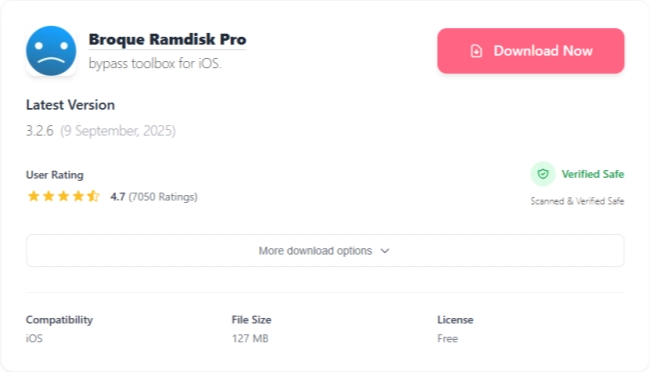
As of August 2026, OneJailbreak lists Broque Ramdisk Pro v3.2.6 for Windows. This is a third-party listing rather than a consistently maintained official Broque download page.
- Latest version found: Broque Ramdisk Pro v3.2.6
- Third-party Download source: Broque Ramdisk Pro OneJailbreak Download Link
Before downloading, make sure the version supports your iPhone or iPad and iOS version. Since Broque Ramdisk Pro is also distributed through third-party websites and file-sharing services, avoid unknown cracked or repackaged copies, which may have been modified or contain security risks.
Is Broque Ramdisk Pro Free?
Some Broque Ramdisk Pro releases have been distributed for free. However, certain functions may depend on registration or online services, so availability can vary by version.
Is Broque Ramdisk Pro Safe?
The main risk is that Broque Ramdisk Pro is shared through different websites and file hosts, making it difficult to know whether every download is original.
For safer use:
- Download only from a source you trust.
- Scan the file before opening it.
- Avoid cracked or repackaged versions.
- Do not disable antivirus protection just to run the tool.
- Back up important data before making system-level changes.
Also note that a successful Activation Lock bypass does not always mean every iPhone function, such as cellular service, will work normally afterward.
How to Use Broque Ramdisk Pro for Activation Lock Bypass
Broque Ramdisk Pro can bypass the Activation Lock screen on certain supported iPhones and iPads. Only use it on a device you own or are authorized to manage.
- Step 1. Extract the Broque Ramdisk PRO.exe file from the zip folder and run it as an administrator. (Password for current ZIP: 123)
- Step 2. Connect your iOS device to your computer using a USB cable and put it in DFU mode. The software will automatically detect your device model and iOS version.
- Step 3. Copy your device's ECID and register it via a Telegram bot, as required by the tool.
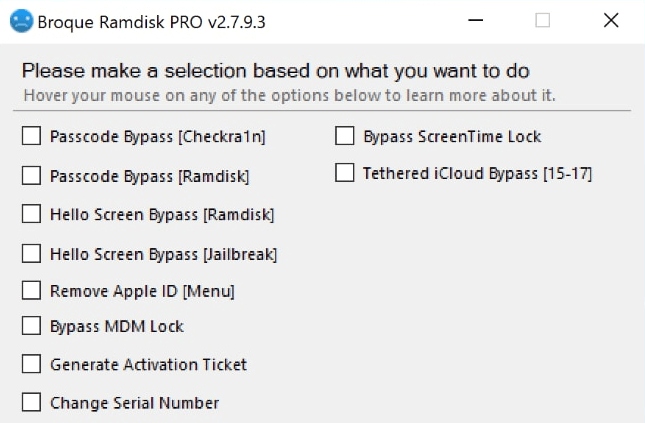
- Step 4. Select the option "Hello Screen Bypass [Ramdisk]" and click "Start". Broque Ramdisk PRO will create and inject a custom RAM disk into your device.
- Step 5. Once the process completes, restart the device and check whether you can access the Home Screen.
 Note
Note
A successful bypass does not necessarily remove Activation Lock from Apple's servers. Depending on the device and method, features such as cellular service, iCloud sign-in, or other Apple services may remain unavailable. The exact buttons and steps can also differ between Broque Ramdisk Pro versions.
Does Broque Ramdisk Pro Really Work?
Yes, Broque Ramdisk Pro can work on some compatible devices, but real-world results are mixed. It is important to separate successful access to the Home Screen from a complete restoration of normal iPhone functionality.
Successful Bypass but No Cellular Service
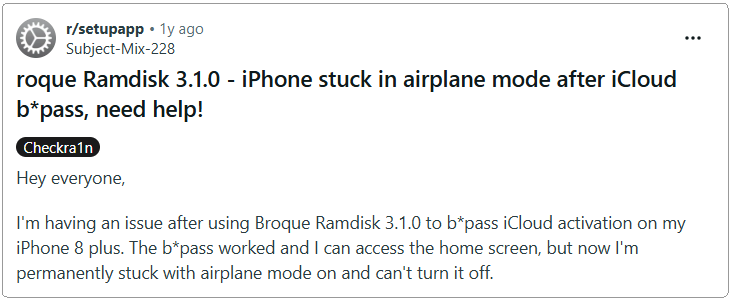
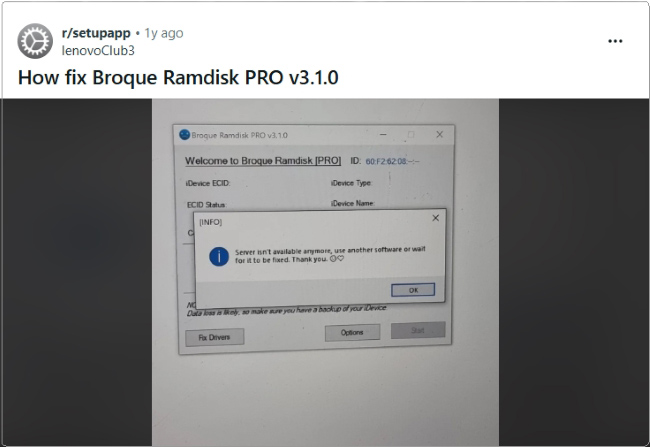
A Broque Ramdisk Pro v3.1.0 user running iOS 16.7.11 reported that the Activation Lock bypass worked and the device reached the Home Screen. However, Airplane Mode could not be turned off, cellular service was unavailable, and only Wi-Fi worked.
Another user reported successfully using Broque Ramdisk Pro on an older iPad Pro, although the same method did not work on another device.
Device Detection Problems
Some users have also reported that Broque Ramdisk Pro could not detect or connect to their iPhone. These problems may depend on the device, drivers, connection, or Broque version.

Version-Specific Bugs
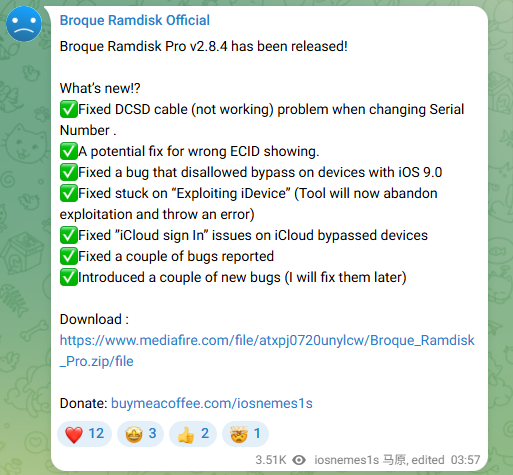
The official Broque Ramdisk Pro v2.8.4 release notes confirm that earlier versions had issues such as incorrect ECID detection, devices getting stuck on "Exploiting iDevice," DCSD cable problems, and iCloud sign-in errors. v2.8.4 included fixes for these problems.
Bottom line: Broque Ramdisk Pro can work on supported older devices, but it is not a guaranteed one-click solution. A successful bypass may still leave some functions, such as cellular service, unavailable.
Pros and Cons of Broque Ramdisk Pro
Broque Ramdisk Pro can be useful on some older devices, but compatibility and usability vary by version.
 Pros:
Pros:- Free Builds Available: Some Windows releases have been distributed for free.
- Activation Lock Bypass: Can bypass the Activation Lock screen on supported older iPhones and iPads.
- Multiple Advanced Tools: Includes ramdisk, jailbreak, device detection, and other device-servicing functions.
- Older Device Support: Commonly documented workflows cover several A9–A11 devices, including the iPhone 6s through iPhone X.
 Cons:
Cons:- Limited Device Compatibility: Newer iPhones are not fully supported by its traditional checkm8-based methods.
- Some Features May Stop Working: Depending on the bypass method, cellular service, iCloud features, or other Apple services may be unavailable afterward.
- Not Beginner-Friendly: DFU Mode, drivers, ramdisk files, and other technical steps may be required.
- Download Safety Concerns: Broque is distributed through different websites and file hosts, so users need to avoid modified or unsafe copies.
- Pricing and Registration Can Vary: Some Mac builds or server-based functions may require registration or payment.
Common Broque Ramdisk Pro Errors and Fixes
If Broque Ramdisk Pro does not work as expected, try the following fixes based on the error you see.
Error 1. iDevice Not Detected
If Broque cannot detect your iPhone or iPad:
- 1. Reconnect the device and try another USB port or cable.
- 2. Make sure Apple device drivers are installed correctly on Windows.
- 3. Put the device into the required mode, such as DFU Mode.
- 4. Confirm that your device model and iOS version are supported.
If Windows itself cannot recognize the device, fix the connection or driver issue before reopening Broque Ramdisk Pro.
Error 2. Failed to Load or Mount Ramdisk
If Broque cannot load the ramdisk:
- Make sure you are using the correct files for your device and Broque version.
- Re-download incomplete files from the same trusted source.
- Confirm that your iOS version is supported.
- Keep the USB connection stable during the process.
Do not mix ramdisk files or instructions from different Broque versions.

Error 3. Stuck on "Exploiting iDevice"
Restart Broque Ramdisk Pro, reconnect the device, and enter DFU Mode again.
Also check that your device and iOS version are supported by the Broque version you are using. Broque Ramdisk Pro v2.8.4 previously included a fix for devices getting stuck at the "Exploiting iDevice" stage.
Easier Broque Ramdisk Pro Alternative: TunesKit iPhone Unlocker
If Broque Ramdisk Pro feels too technical or you cannot verify which build to download, TunesKit iPhone Unlocker is another option for supported devices. For Activation Lock removal, TunesKit iPhone Unlocker currently supports iPhone 5s through iPhone X running iOS 12.0 to iOS 16.7.15. It also provides an Activation Lock removal workflow that does not require jailbreaking.
TunesKit iPhone Unlocker also includes separate modes for screen passcodes, Apple Account removal, MDM restrictions, Screen Time passcodes, and other supported iOS unlocking scenarios.
Broque Ramdisk Pro vs TunesKit iPhone Unlocker
| Feature | Broque Ramdisk Pro | TunesKit |
|---|---|---|
| Activation Lock | Available on compatible builds/methods | Available on supported devices |
| Ease of use | More technical | Guided interface |
| Jailbreak | May be involved | Not required |
| Compatibility | Varies by build | iPhone 5s through iPhone X running iOS 12.0 to iOS 16.7.15 |
| Windows/macOS | Varies | Windows/macOS |
| Best for | Experienced users | Users preferring guided steps |
How to Remove Activation Lock with TunesKit iPhone Unlocker
- Step 1. Install and open TunesKit iPhone Unlocker on your computer. Connect your supported iPhone with a USB cable, then select Remove iCloud Activation Lock from the main interface.
- Step 2. Click Start. TunesKit will guide the device into Recovery Mode. Then follow the onscreen instructions to put the iPhone into DFU Mode.
- Step 3. Once the device is ready, TunesKit starts the Activation Lock removal process. Keep the iPhone connected until it finishes.

Conclusion
Broque Ramdisk Pro can work on certain older iPhones and iPads, but compatibility, setup complexity, download sources, and post-bypass limitations vary by version. It is better suited to experienced users who understand DFU and ramdisk workflows.
If you prefer guided steps on a supported device, TunesKit iPhone Unlocker is an easier alternative. Whichever tool you use, verify compatibility first and only work with devices you own or are authorized to manage.