


iTools BT Dongle Review: Is It Worth Buying 2026?
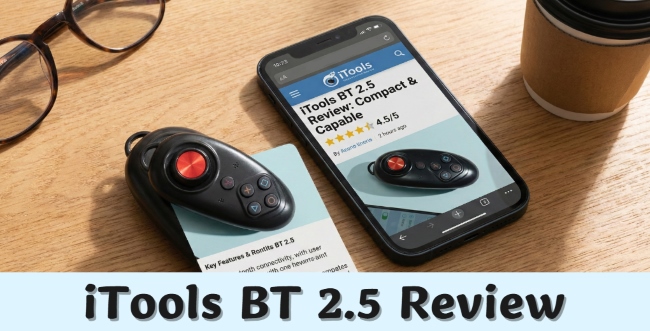
With Niantic cracking down on modified apps like PGSharp, many Pokémon GO players are turning to hardware-based GPS spoofing. The iTools BT 2.5 is widely regarded as the gold standard, using a physical joystick to change your GPS location at the system level while letting you play with the official app. However, the iTools dongle comes with a high price and iOS distance limits.
In this iTools BT 2.5 review, we'll explain everything you need to know about the iTools BT 2.5 and introduces a software alternative for those seeking a simpler solution.
- Part 1. What Is iTools BT 2.5
- Part 2. Pros and Cons of iTools Dongle Pokémon GO
- Part 3. How to Use iTools BT 2.5 for Pokémon GO
- Part 4. How to Bypass Distance Limit of iTools Dongle
- Part 5. Cheaper and Easier Alternative to iTools BT 2.5 HOT
- Part 6. Safety Guidelines: Respect the Cooldown
- Part 7. FAQs on iTools Dongle
Part 1. What Is iTools BT 2.5
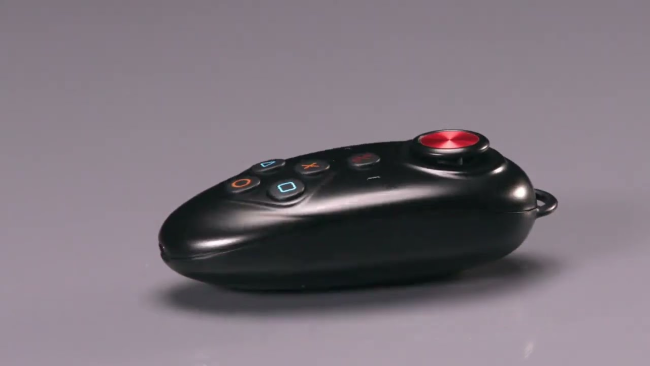
The iTools BT 2.5 is a compact Bluetooth GPS dongle, about the size of a car key fob. It wirelessly connects to your iPhone or iPad and works as an external GPS source, sending fake location data to your device. Once paired, all apps, including Pokémon GO, think you’re moving in the real world.
Features of iTools BT Dongle
- Physical Joystick: Smooth 360° movement for walking, raids, and nest farming
- GPX Route Support: Import routes to auto-walk and hatch eggs
- Portable Design: Lightweight and easy to carry or attach to a keychain
- USB-C Charging: Modern charging standard for faster and more convenient power.
- Custom Speed Control: Adjust movement speed anytime
Compatibility of iTools BT 2.5
The device is designed exclusively for iOS (iPhones and iPads). It supports the latest iOS versions, including iOS 18 and iOS 26. However, significant setup steps are required for these newer iOS versions to bypass Apple's security restrictions (see Part 4). It is not compatible with Android devices.
Prices of iTools BT 2.5
The iTools BT 2.5 is a premium product.
- Standard Joystick: Approximately $72.99 USD.
- Bundle (Joystick + RJ45 Adapter): Approximately $82.99 USD.
iTools BT 2.0 vs 2.5: What's The Improvement
Compared to the older 2.0 model, the iTools BT 2.5 offers several upgrades:
- Connector: The 2.5 uses USB-C, whereas the 2.0 used older micro-USB or proprietary ports.
- Battery Life: The 2.5 features an upgraded battery module for longer play sessions (10+ hours).
- Stability: Improved Bluetooth connectivity reduces connection drops compared to the 2.0.
Part 2. Pros and Cons of iTools Dongle Pokémon GO
 Pros:
Pros:- High Safety Profile: One of the safest known method for spoofing on iOS because it does not inject code into the game;
- Wireless Freedom: No need to keep your phone plugged into a computer while playing (unless using the RJ45 bypass method);
- User Experience: The physical joystick feels more "real" and responsive than on-screen overlays.
 Cons:
Cons:- Expensive: At ~$70+, it is significantly costlier than software subscriptions;
- Complex Setup: Requires installing a companion app via TestFlight (which needs an invite) and configuring specific settings;
- Distance Limitation: On iOS 13+, you are limited to 7–15km from your real location unless you use advanced bypass methods.
- Device Limit: It can only connect with 1 iOS device and is not compatible with Android device.
Part 3. How to Use iTools BT 2.5 for Pokémon GO
Using the device requires a specific pairing sequence to ensure it works correctly with the companion app.
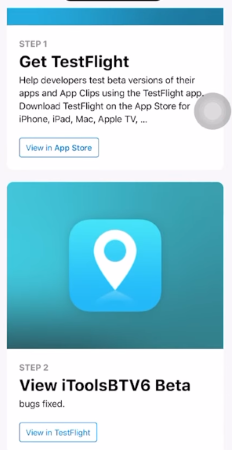
Step 1. Install the Companion App via TestFlight
After purchase, you'll receive an email invitation to download the iTools companion app via TestFlight (often listed under a generic or disguised app name).
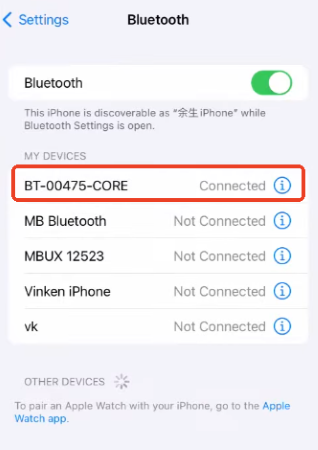
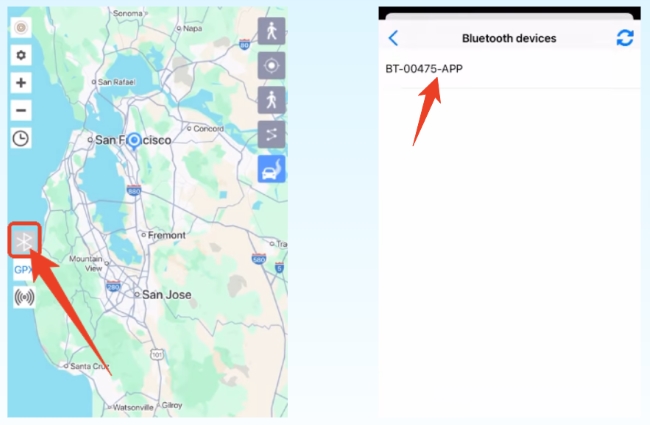
Step 2. Pair the Device via Bluetooth
Power on the iTools dongle, then go to Settings > Bluetooth on your iPhone and tap the device name (such as Joystick-BLE) to pair.
Step 3. Connect Inside the App
Open the iTools app and tap the Bluetooth icon to complete the connection. When successful, the status icon will turn green.
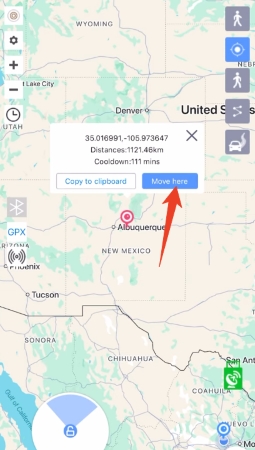
Step 4. Start Spoofing in Pokémon GO
Select Virtual Location mode, launch Pokémon GO, and use the physical joystick to walk or tap on the map to teleport.
Part 4. How to Bypass Distance Limit of iTools Dongle
If you are on iOS 13 or later, Apple prevents external GPS devices from simulating locations further than 7–20km from your actual position. If you try to go further, your location will bounce back to your house.
To spoof locations worldwide with the iTools BT 2.5, you'll need to use one of the following bypass methods:
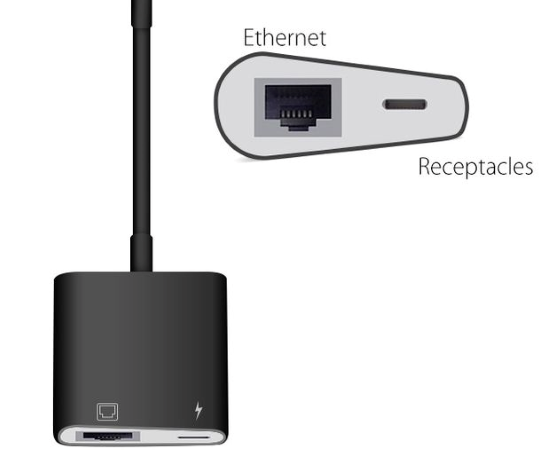
Method 1: The RJ45 Ethernet Adapter (Wired)
This is the most stable and reliable option.
Step 1. Turn off Wi-Fi and Bluetooth on your iPhone.
Step 2. Connect an RJ45 Ethernet Adapter to your iPhone's Lightning/USB-C port and plug in an ethernet cable from your router.
Step 3. This forces the phone to get data via the cable, bypassing the Wi-Fi check that Apple uses to verify your location.
By forcing the phone to use a wired internet connection, this method bypasses Apple’s Wi-Fi-based location checks.
Method 2: NextDNS (Wireless)
This option lets you spoof without cables but requires more setup.
Step 1. Configure a custom DNS profile using NextDNS.
Step 2. Block Apple's location verification domains (e.g., apple-dns.net).
Once configured correctly, you can spoof globally over Wi-Fi without an Ethernet cable. For a step-by-step walkthrough, you can watch this detailed video guide on bypassing distance limit via NextDNS
Part 5. Cheaper and Easier Alternative to iTools BT 2.5
For many players, the high cost of the iTools dongle and its complicated distance-bypass setup are major drawbacks. If you want a simpler solution without buying extra hardware, TunesKit Location Changer is a popular and budget-friendly alternative.
What Is TunesKit Location Changer
TunesKit Location Changer is desktop software for Windows and Mac that lets you change your GPS location on iPhone and Android with just one click. Instead of paying $70+ for a physical device, you connect your phone to a computer (USB for the first setup, then Wi-Fi or Bluetooth) and control your movement directly on a map.
It offers many of the same features as the iTools BT 2.5, such as a virtual joystick and GPX route support, but at a much lower cost, starting at $9.95 for a month, $19.95 for a 3-month plan or $89.95 for lifetime access with free lifetime update and responsive customer support.
Key Features of TunesKit Location Changer:- Virtual joystick for smooth movement in 1 click
- GPX route import for auto-walking
- Supports both iOS and Android
- No distance limits or extra bypass tools required
- Flexible 5 movement modes: Change Location, Jump Teleport, Two-Spot, Multi-Spot, and Joystick movement.
- Allow custome routes and speed
- Manage up to 10 devices at the same time
Best iTools BT 2.5 Alternative - TunesKit Location Changer
Save money, avoid complex setups, and unlock unlimited teleportation and smooth joystick control - your ultimate spoofing companion.
 600,000+ Downloads
How to Use TunesKit Location Changer for Pokémon GO
Getting started with TunesKit is fast and beginner-friendly:
Step 1 Connect Your Device
Launch TunesKit on your computer and connect your iPhone via USB cable. Select "Game Mode".

Step 2 Select a Location
A map will appear. You can click anywhere in the world or search for specific coordinates (e.g., Pier 39 in San Francisco). After all is set, click Start Modifying to teleport.

Part 6. Safety Guidelines: Respect the Cooldown
No matter whether you use iTools BT 2.5 or TunesKit Location Changer, the biggest cause of bans is user behavior, not the spoofing tool itself. The most important rule to follow is the Cooldown Timer.
Every in-game action - catching a Pokémon, spinning a PokéStop, or dropping a ball - records your location. If you teleport to a new place, you must wait before interacting again. Here's a simple cooldown reference:
- 1 km: ~1 minute wait
- 10 km: ~6 minutes wait
- 100 km: ~35 minutes wait
- 1000+ km: 2 hours wait (Maximum)
Rule of Thumb: When teleporting long distances, always wait 2 hours before playing again. Ignoring cooldowns can lead to soft bans, where Pokémon flee instantly and PokéStops stop giving items.
Part 7. FAQs on iTools Dongle
-
1. Can I Use iTools BT 2.5 on Android?
No. The iTools dongle is designed exclusively for iOS devices. Android users will need different spoofing methods, often involving root access, or use TunesKit Location Changer too.
-
2. Does iTools BT 2.5 Charge My Phone While Playing?
No. The dongle has its own battery. However, if you use an RJ45 Ethernet adapter for distance bypassing, many models include a pass-through port that allows phone charging at the same time.
-
3. Is the iTools Companion App on the App Store?
No. The app must be installed through Apple TestFlight using an invitation code provided by the seller. Besides, you must reinstall the app per 90 days to activate the app again.
Part 8. Conclusion
To sum up, the iTools BT 2.5 remains one of the safest hardware spoofing option for iOS, ideal for serious Pokémon GO players who want maximum protection. However, its high cost and tricky setup can be a barrier.
For a budget-friendly, easy-to-use alternative, TunesKit Location Changer offers powerful GPS spoofing features without extra hardware or complex workarounds. It supports both iOS and Android, making it perfect for casual and advanced users alike.


