


Pokémon GO Postcards: How to Get, Pin & Send [Full Guide]
The Postcard Book feature in Pokémon GO was originally created as a fun way for players to collect and preserve Pokémon GO postcards from gifts sent by friends around the world. What started as a simple memory-keeping feature has now become an important part of gameplay, especially if you want to progress in the Vivillon Collector Medal.
Here is the complete guide on how to pin Pokémon GO postcards and how to manage them effectively.

Part 1. How to Pin Pokémon GO Postcards
Pinning a postcard in Pokémon GO saves its location in your Postcard Book and counts toward your progress for that region's Scatterbug encounter.
There are two easy ways to pin Pokémon GO postcards, depending on whether you're receiving or sending gifts.
Method 1. Pin Gifts from Friends (The Receiver)
This is the most common and important method for collecting different Vivillon patterns. To unlock Scatterbug encounters from various regions, you must pin the postcards attached to gifts sent by your friends.
 Trainer Tip
Always pin the postcard before opening the gift. If you open the gift first, the postcard will be lost and cannot be pinned.
Step 1. Tap your Trainer Profile icon and go to the Friends tab.
Step 2. Select a friend who has sent you a gift.
Step 3. Tap the gift box to view the postcard. Do not tap "Open" yet.
Step 4. Tap the thumbtack icon (Pin button) located to the right of the "Open" button.
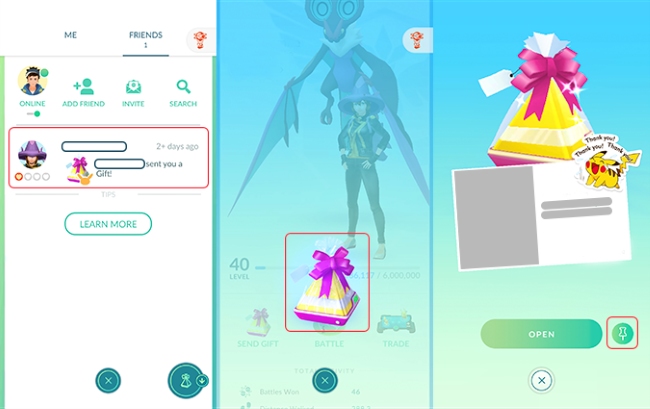
Once the pin turns yellow, the postcard is saved, and you have gained credit for that region. You can now open the gift or even unpin the postcard immediately to save Postcard Book space (the credit remains!).
Method 2. Pin Your Own Gifts (The Sender)
You can also pin postcards from your own gift inventory before sending them to friends. This method is perfect for saving memories from special trips, events, or unique locations you've visited as the postcard will disappear once you send it to your friends.
Step 1. Open your Item Bag and scroll down to Gifts.
Step 2. Tap on the gift stack to view your current inventory.
Step 3. Select the specific gift you want to save.
Step 4. Tap the Save (thumbtack) icon near the bottom of the screen.
The postcard will now be added to your Postcard Book, letting you keep a permanent reminder of that location even after the gift is sent.

Part 2. How to Get Postcards in Pokémon GO
Postcards in Pokémon GO can't be collected as standalone items - they always come attached to Gifts. Therefore, how to get postcards in Pokémon GO is really about how to efficiently farm Gifts.
Thankfully, there are two main ways to stock up on Gifts and, in turn, postcards.
#1. Spin PokéStops and Gyms
Spinning the Photo Disc at a PokéStop or Gym is the most reliable way to get Gifts. Each spin has a high chance of rewarding you with one, especially if you still have space in your inventory.
Trainer Tip
You can hold up to 20 Gifts in your Item Bag at one time. If your Gift storage is full, you won't receive more until you send or discard some.
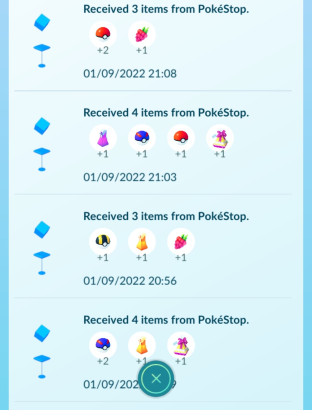
#2. Receive Gifts from Your Buddy Pokémon
Your Buddy Pokémon can also help you collect Gifts. If your Buddy has reached at least the Great Buddy level (2 Hearts) and your Gift inventory is running low, it will occasionally bring you a bundle of Gifts from nearby PokéStops.

Part 3. How to Send Postcards in Pokémon GO
Sending postcards in Pokémon GO is more than just sharing items - it's a fun way to show off local landmarks, help your friends complete their Vivillon collections, and increase your Friendship level faster. Once you know how to send postcards in Pokémon GO, gifting becomes quick, meaningful, and rewarding for everyone involved.
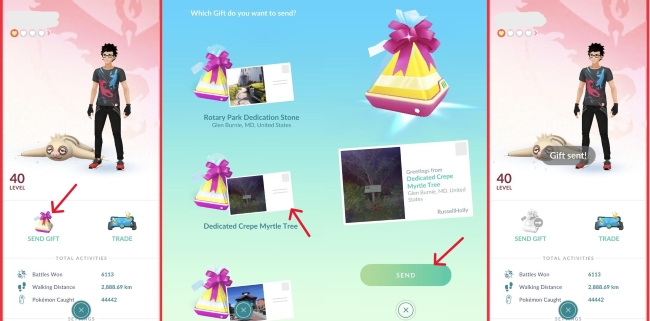
Step 1. Open your Friends List and tap on the profile of the friend you want to send a gift to.
Step 2. Tap the Send Gift button.
Step 3. Browse the carousel of available gifts in your inventory and select the postcard featuring the location or landmark you'd like to share.
Step 4. (Optional) Tap Add Sticker to personalize your postcard and make it more fun or expressive.
Step 5. Tap Send to deliver the gift and postcard to your friend.
Part 4. How to Delete Postcards in Pokémon GO
The default storage limit for the Postcard Book in Pokémon GO is 350 postcards, which dedicated collectors can reach surprisingly fast. Once you see the "Postcard Book is full" message, you'll need to free up space before you can pin new ones.
Knowing how to delete postcards in Pokémon GO efficiently helps you keep collecting without losing important progress.
Step 1. Open your Trainer Profile and tap the Postcard Book icon.
Step 2. Long-press (tap and hold) on any postcard until it is highlighted. This activates "Selection Mode."
Step 3. Tap all other postcards you wish to remove. You can scroll and select multiple cards quickly.
Step 4. Tap the Remove button in the bottom right corner to delete them all at once.
If you only want to remove a single postcard, tap on the postcard you want to delete, tap Menu > Delete, and confirm the remove.

Trainer Tip: Protect Your Favorite Postcards
To avoid accidentally deleting postcards you want to keep, you can mark them as "Favorite." Favorited postcards will not be removed when you mass-delete Pokémon GO postcards, making it easier to clean up your Postcard Book safely.
Part 5. Faster Way to Get Pokémon GO Postcards Worldwide
Completing the Vivillon map requires postcards from 18 different regions, such as "Ocean" (Hawaii), "Tundra" (Iceland), and "Sandstorm" (Middle East). For many players, relying only on local friends, or waiting for international players to send gifts, can make this goal extremely difficult.
For players who struggle to find active friends in rare regions or prefer to collect postcards autonomously, using a location tool like TunesKit Location Changer is a viable alternative solution. TunesKit Location Changer is a desktop utility that lets you virtually change your GPS location on Android & iOS devices to anywhere in the world without leaving your home.
 How it helps with Postcards:
- Collect Postcards from Specific Regions: Instantly move your in-game location to precise coordinates, such as a PokéStop in Tokyo for the Elegant pattern or Hawaii for the Ocean pattern.
- Play Independently: Once teleported, you can spin PokéStops, receive Gifts, and pin postcards to your own Postcard Book. These pins count toward your Vivillon medal, up to the daily limit of three self-gift pins.
- No Waiting: Skip the hassle of sending friend requests and waiting for strangers to return gifts. You stay in control of your progress at all times (with your another account).
Pin Pokémon GO Postcards Anywhere with TunesKit Location Changer
Install TunesKit Location Changer to safely change your Pokémon GO location, spin international PokéStops, and pin postcards on your own schedule.
 600,000+ Downloads

Part 6. FAQs on Pokémon GO Postcards
-
1. What Are Postcards in Pokémon GO?
Postcards are digital images of PokéStops and Gyms attached to the Gifts you send and receive. Each postcard records the real-world location where the gift was collected.
-
2. Why Save Postcards in Pokémon GO?
While some players enjoy saving postcards for their memories or unique locations, the primary reason to pin postcards in Pokémon GO is to unlock Scatterbug encounters. This is because pinning postcards from specific geographic regions is the only way to evolve Scatterbug into Vivillon with different regional wing patterns.
-
3. Is There A Daily Limit on Pinning Pokémon GO Postcards?
Yes and no. You can pin an unlimited number of postcards received from friends, restricted only by how many gifts you can open each day. However, you can only pin three postcards from your own outgoing gifts per day that count toward Vivillon medal progress.
-
4. Do I Need to Buy More Postcard Book Storage?
Not necessarily. While you can purchase Postcard Pages from the in-game shop to expand your storage limit up to 1,000 postcards, there's a simpler alternative - the Pin-and-Unpin strategy: Pin a postcard to receive the Vivillon region credit, then immediately unpin it. This allows you to earn rewards without filling up your Postcard Book.
Part 7. Conclusion
This is all about how to pin a postcard in Pokemon GO, along with how to get, send, and delete them effeciently. By knowing these steps, you can efficiently farm Scatterbug encounters, manage your Postcard Book with ease, and steadily work toward completing the Vivillon Collector Medal.
Whether you choose to build a global network of friends or utilize tools like TunesKit Location Changer to visit regions yourself, the Platinum Vivillon Medal is well within reach, and your Postcard Book will soon be filled with postcards from all around the world.


