


WooTechy WhatsMover Review (2026): Is It the Best WhatsApp Transfer Tool?
Switching between devices is often frustrating because official WhatsApp transfer methods frequently fail or require factory resets. WooTechy WhatsMover offers a third-party solution, promising a seamless migration of your chats, photos, and attachments without data loss. However, potential users need to know if this tool is truly safe, effective, and worth the investment before trusting it with private conversations.
This review breaks down WhatsMover's features, pricing, and performance to verify its claims. We analyze its safety profile and reliability to see if it justifies the cost. Additionally, we explore the best alternative solutions, ensuring you have the necessary information to choose the right method for your cross-platform data transfer.
- Part 1. What Is WooTechy WhatsMover?
- Part 2. Is WooTechy WhatsMover Safe and Legit?
- Part 3. Detailed Feature Breakdown
- Part 4. Pricing: Is It Worth It?
- Part 5. How to Use WooTechy WhatsMover (Step-by-Step)
- Part 6. Pros and Cons of WooTechy WhatsMover
- Part 7. Best Alternative: TunesKit WhatsApp TransferHOT
Part 1. What Is WooTechy WhatsMover?
WooTechy WhatsMover is a desktop software designed to manage WhatsApp and WhatsApp Business data. Its primary selling point is the ability to bridge the gap between Android and iOS, handling transfers that the native WhatsApp app struggles with due to the incompatibility between Google Drive (Android) and iCloud (iOS).
Beyond simple transfers, it functions as a complete WhatsApp management suite, offering backup, restore, and export capabilities.

Key Features at a Glance
- Cross-Platform Transfer: Transfer WhatsApp from Android to iPhone, iPhone to Android, or between similar devices without a factory reset.
- Backup to PC: Create full backups of your WhatsApp data on your computer (Windows/Mac) to avoid cloud storage limits.
- Restore Backups: Restore older backups to new devices anytime without uninstalling the app.
- Export Data: Save chats as HTML, PDF, CSV, or Excel files—perfect for printing legal evidence or business records.
- Compatibility: Supports the latest iOS 26 and Android 16 versions.
Part 2. Is WooTechy WhatsMover Safe and Legit?
Before installing any software that handles personal data, safety is the top concern.
Is It Legit?
Yes, WooTechy is a legitimate software company. The WhatsMover tool has been on the market for several years and has accumulated verified user reviews. It is a functioning utility product, not a scam.
Is It Safe?
According to the company's privacy policy, the software operates in "read-only" mode during transfers.
- No Data Retention: The transfer happens locally between your devices and your computer via USB. The company claims no personal chat data is stored on their servers.
- No Malware: Scans of the official installer typically show it is free from viruses or malware.
- Encryption: It supports transferring accounts even with Two-Factor Authentication (2FA) enabled, provided you can verify your phone number.
Part 3. Detailed Feature Breakdown
1. WhatsApp Transfer (Android <-> iOS)
This is the "star" feature. Unlike the official "Move to iOS" app, which forces you to wipe your iPhone to transfer data during the initial setup, WhatsMover allows you to transfer data to an active phone. It handles text, photos, videos, and even voice notes effectively.
2. Free Unlimited Backup
WhatsMover allows you to back up your WhatsApp data to your computer for free (in the trial version). This is significantly safer than cloud backups because it is not subject to storage caps and is accessible even if your cloud account is locked.
3. Export WhatsApp Chat to PDF/Excel
This feature is excellent for professional needs. You can export specific conversations as:
- PDF: Best for printing or reading like a document.
- HTML: Best for viewing attachments like images in their original context.
- Excel/CSV: Best for sorting data or analyzing chat logs.
Part 4. Pricing: Is It Worth It?
A common misconception is that WhatsMover is free. It is not.
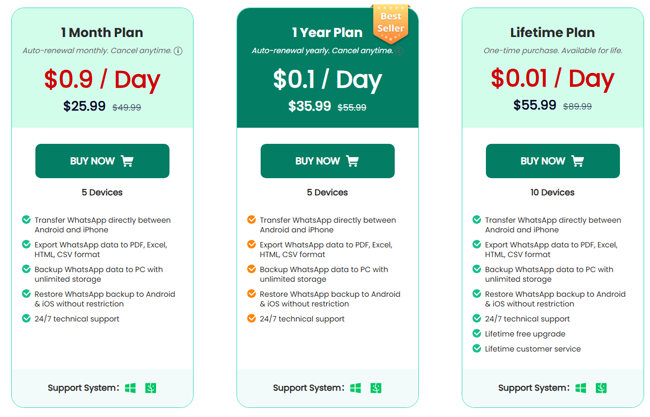
- Free Trial: Allows you to back up data and preview it. To transfer or export, you must pay.
- 1-Month Plan: $25.99 (Best for a single transfer).
- 1-Year Plan: $35.99 (Good for frequent phone switchers).
- Lifetime Plan: $55.99 (One-time purchase)
Part 5. How to Use WooTechy WhatsMover (Step-by-Step)
If you decide to stick with WooTechy, here is how to perform the transfer:
Step 1: Open WhatsMover and select Transfer WhatsApp between Devices. Connect both phones to your PC via USB.
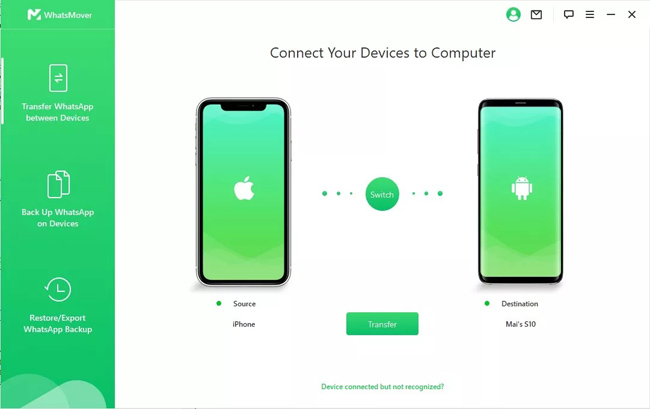
Step 2: Verify the Source and Destination devices. Click Transfer. Choose WhatsApp Messenger or Business when prompted.
Step 3: Follow the on-screen prompts to turn off "Find My iPhone" on the destination device and enable USB debugging on the Android device.

Step 4: Wait for the progress bar to reach 100%. Your iPhone will restart, and your chats will be available in WhatsApp.

Part 6. Pros and Cons of WooTechy WhatsMover
 Pros:
Pros:- No Factory Reset Required: You can transfer data to an iPhone that is already set up.
- High Success Rate: Generally more reliable than "Move to iOS" for heavy data loads.
- All Data Types: Transfers stickers, voice notes, and attachments seamlessly.
- Easy Interface: Designed for non-technical users.
 Cons:
Cons:- Cost: It is relatively expensive for a tool you might only use once.
- Installation Steps: Requires installing a custom WhatsApp version temporarily on Android, which can be tedious.
- Slow Speeds: Large backups (10GB+) can take a significant amount of time to process.
Part 7. Best Alternative: TunesKit WhatsApp Transfer
While WooTechy WhatsMover is a capable tool, many users find the price point slightly high for a single use, or they encounter stability issues during large file transfers. If you are looking for a tool that offers a better balance of speed, success rate, and affordability, we highly recommend TunesKit WhatsApp Transfer.
TunesKit WhatsApp Transfer is a comprehensive utility designed to handle every aspect of WhatsApp data management. Whether you are switching from iPhone to iPhone, upgrading to a new device, or simply need a safe WhatsApp backup on your PC, TunesKit provides a one-click solution.
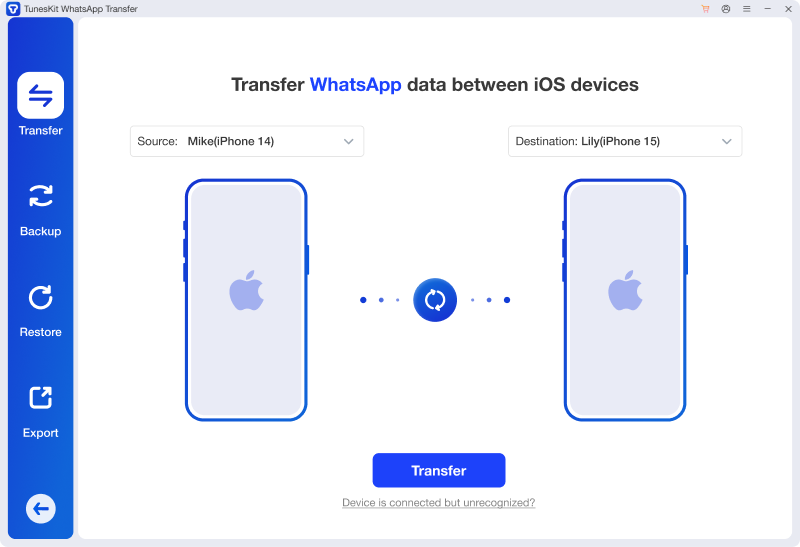
Best WooTechy WhatsMover Alternative
One of the best WooTechy WhatsMover alternative. Transfer WhatsApp data between iOS devices in one click.
 600,000+ Downloads
Features of TunesKit WhatsApp Transfer:
- Feature-Rich: Supports Transfer, Backup, Restore, and Export.
- Privacy First: Ensures 100% local transfer with no data leaks.
- Fast Processing: Optimized algorithms make it faster at scanning and deploying backup files than many competitors.
- Rich-App Supported: Besides WhatsApp and WhatsApp Business, TunesKit WhatsApp Transfer also supports Viber, LINE, and Kik.
If you want a more affordable, faster, and highly reliable tool—especially if you are heavily invested in the Apple ecosystem—TunesKit WhatsApp Transfer is the smarter buy.
Why Choose TunesKit Over WooTechy?
TunesKit WhatsApp Transfer has rapidly gained popularity for being a lightweight, high-performance alternative. It is particularly praised for its stability and user-friendly design.
1. Superior Value for Money
TunesKit is often more affordable than WooTechy.
- TunesKit Monthly: $19.95 (vs. WooTechy's $25.99)
- TunesKit Lifetime: Significantly better value for long-term users.
 Pro-tip:
Click to view the full TunesKit WhatsApp Transfer price
If you only need to perform a transfer once, TunesKit saves you money immediately.
2. Higher Success Rate for iOS Management
Users report fewer connection errors with TunesKit. It is optimized specifically for handling complex iOS data structures, making it the premier choice for:
- iPhone to iPhone Transfer: It handles large media files faster than WhatsMover.
- Backup & Restore: It creates encrypted backups on your PC that are easy to view and restore.
3. Simplified User Experience
TunesKit features a modern, "drag-and-drop" style interface that is less cluttered than WooTechy's. It guides you through trusting the computer with clear, animated instructions, reducing the chance of user error.
Part 4. Final Verdict
WooTechy WhatsMover is a functional solution for users desperate to move their chats across platforms without wiping their phones. It solves a real problem that Apple and Google have failed to address fully.
However, if you are looking for a better deal and a smoother experience, we recommend checking out TunesKit WhatsApp Transfer first. With its lower price point ($19.95) and robust performance, it offers the same core capabilities with a better user experience.


