


Loader.to Review: Is It Safe & Does It Still Work?
Finding a reliable YouTube downloader without malware is increasingly difficult. Loader.to positions itself as a powerful web-based solution, offering premium features like 8K resolution support and batch playlist downloading. It promises high-quality conversions without the need for paid software, making it a tempting choice for users wanting top-tier performance.
But does it deliver on its promises? This Loader.to review dives into Loader.to's capabilities to determine if it is truly legitimate. We will test its download speeds, analyze its features, and answer the most important question: Is Loader.to safe to use? Here is everything you need to know before using this service.

Part 1. What Is Loader.to?
Loader.to is a web-based media conversion tool that allows users to download videos and audio from various platforms, primarily YouTube. Unlike basic converters that only support standard HD (1080p), Loader.to distinguishes itself by offering support for ultra-high-definition formats like 4K and 8K, as well as the ability to convert entire YouTube playlists into MP3 or MP4 files in a single click.

Because it is a web-based tool, it requires no software installation, making it accessible from Windows, macOS, Android, and iOS devices.
Part 2. Key Features of Loader.to
While many downloaders look the same on the surface, Loader.to offers a specific set of features that appeals to power users.
1. 4K and 8K Video Support
Most free online converters cap video quality at 1080p. Loader.to stands out by allowing users to download videos in their original source quality, up to 4K (2160p) and even 8K (4320p). This is essential for users archiving high-fidelity content or creators who need raw footage for editing.
2. Batch Playlist Downloading
This is arguably the tool's strongest selling point. Instead of pasting links one by one, Loader.to allows you to paste a link to a YouTube playlist, and it will parse all the videos within it. You can then choose to download the entire batch or select specific tracks.
Ideal for: Downloading music albums, podcast series, or educational course lists.
3. Wide Range of Format Support
The platform supports a variety of file containers, ensuring compatibility with almost any device.
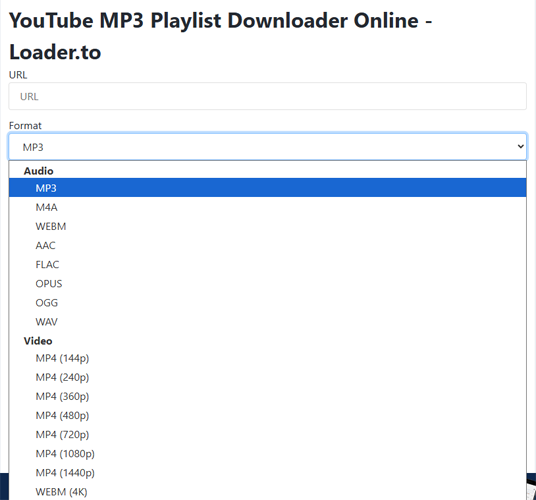
- Audio: MP3 (up to 320kbps), M4A, WEBM, AAC, FLAC, OPUS, OGG, WAV.
- Video: MP4 (360p to 8K), WEBM.
4. Cross-Platform Compatibility
Since it operates entirely in the cloud, you don't need to install an .exe or .dmg file. It works effectively on:
- Google Chrome, Firefox, and Edge browsers.
- Mobile browsers on Android and iPhone (Safari).
Part 3. Safety Check: Is Loader.to Safe?
This is the most critical part of our Loader.to review. Free online downloaders are notorious for aggressive advertising, pop-ups, and potential malware risks.
The Adware Issue
Loader.to is free because it is ad-supported. However, the advertising method it uses can be intrusive.
- Pop-ups: When you click the Download button, the site often triggers a pop-up window or opens a new tab redirecting you to a betting site, adult content, or a "software update" scam page.
- Redirects: Navigating the site can feel like walking through a minefield. Mis-clicks often lead to third-party domains.
Malware Risks
The Loader.to website itself does not host malware. The files you download (the actual MP3 or MP4 files) are generally clean and safe to open.
However, the danger lies in the advertisements. If a pop-up asks you to "Update your Chrome Player" or "Download this Antivirus," do not click it. These are malicious ads that can infect your computer.
Part 4. How to Use Loader.to (Step-by-Step Guide)
If you decide to use Loader.to, follow this guide to ensure you get your files quickly and avoid the ad traps.
Step 1. Go to YouTube and copy the URL of the video or playlist you want to save.

Step 2. Navigate to the Loader.to homepage and paste the URL into the URL box.
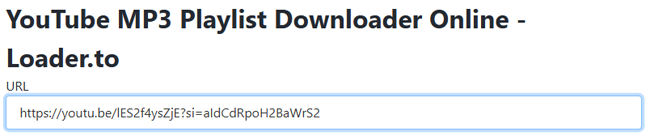
Step 3. Click the Format dropdown menu and select your desired quality (e.g., MP3 for audio or MP4 (1080p) for video).
Step 4. Click the blue Download button. You will see a progress bar as the server converts the file. Once the conversion reaches 100%, a distinct Download button will appear for your specific file. Click it to save the file to your device.

Part 5. Loader.to Performance Review
We tested the downloader with a 10-minute 4K video and a 20-song playlist.
- Speed: Conversion is server-side, meaning it doesn't use your computer's CPU. The 10-minute video took about 45 seconds to process.
- Quality: The downloaded 4K video was crisp, with no watermark or quality loss. The MP3s were true 320kbps.
- Reliability: It occasionally fails to parse very long playlists (over 100 videos), requiring a page refresh.
Pros and Cons
Here is a quick summary to help you decide if this tool is right for you.
 Pros:
Pros:- Supports 4K and 8K downloads
- Excellent playlist/batch downloader
- No software installation required
- Huge variety of audio formats (WAV, FLAC)
- Completely free to use
 Cons:
Cons:- Aggressive pop-up ads and redirects
- No built-in video trimmer or editor
- Conversion can be slow during peak times
- Interface can be confusing for beginners
- Occasional server errors with long videos
Part 6. Top 3 Loader.to Alternatives
If the safety concerns or ads are a dealbreaker for you, here are the best Loader.to alternatives currently available.
1. TunesKit Audio Capture
If your primary goal is to save music, podcasts, or audio from YouTube (or any other site), TunesKit Audio Capture is the professional choice. Unlike Loader.to, which downloads files based on links, TunesKit records the system audio directly with lossless quality. TunesKit Audio Capture supports multiple audio formats, including MP3, WAV, M4A, WMA, etc.
Its key advantages include the ability to record multiple tracks simultaneously to save time, automatic detection and fixing of ID3 tags for organized libraries, and built-in editing tools to trim or merge clips. This makes TunesKit Audio Capture one of the top Loader.to alternatives for capturing and managing high-quality audio from any source efficiently.

Key Features of TunesKit Audio Capture
Download and convert YouTube to MP3 in simple clicks. Record high-quality audio on Win/Mac from any source without losing any audio quality.
 600,000+ Downloads
- Why it's better: It works on any platform (Spotify, Apple Music, YouTube, Twitch) because it captures what you hear. It automatically detects silent gaps to split songs and attempts to fix ID3 tags (Artist, Album, Cover Art) automatically.
- Safety: 100% safe. No ads, no pop-ups, no malware risks.
- Best feature: It supports multi-track recording, meaning you can play multiple videos in different browser tabs, and it will record them as separate, clean audio tracks simultaneously.
2. Cobalt.tools
Cobalt.tools is a free, open-source online media downloader for video and audio from platforms like YouTube, Instagram, TikTok, and X. It prioritizes user privacy and experience, with a clean, ad-free interface, no trackers or paywalls. Users simply paste a link to immediately download high-quality content, providing a safe, streamlined alternative to ad-heavy sites.

- Why it's better: Cobalt has zero ads and zero trackers. It is an open-source project designed purely for functionality.
- Limitation: It is stricter about copyright and may not support downloading from certain protected content types as loosely as Loader.to.
3. Y2Mate
Y2Mate is a popular free online tool for downloading video and audio from YouTube and other streaming platforms, converting content to formats like MP3/MP4 without software installation. Users are cautioned about intrusive pop-up ads and potential malware risks associated with the site.

- Why it's better: Often faster for short, single clips.
- Warning: Like Loader.to, it is heavy on ads, so use an ad blocker.
 Pro-tip:
Final Verdict
Loader.to offers powerful free features like 8K video and playlist downloads, yet its aggressive advertising creates a frustrating, potentially unsafe user experience. While adept users might navigate its ads, we recommend TunesKit Audio Capture for those prioritizing safety, audio quality, and a stress-free experience. TunesKit eliminates malware risks, providing a professional tool for archiving web audio.


