


How to Recover Deleted Keepsafe Photos on iPhone – Top Solutions
Deleted your important Keepsafe photos on iPhone and want to get them back? Don't worry — there are several possible ways to recover deleted Keepsafe photos, even if they are no longer available in the app's Trash folder. Keepsafe is widely used to protect private photos and videos, but accidental deletion can still happen. In this article, we'll explain how to recover deleted Keepsafe photos on iPhone.
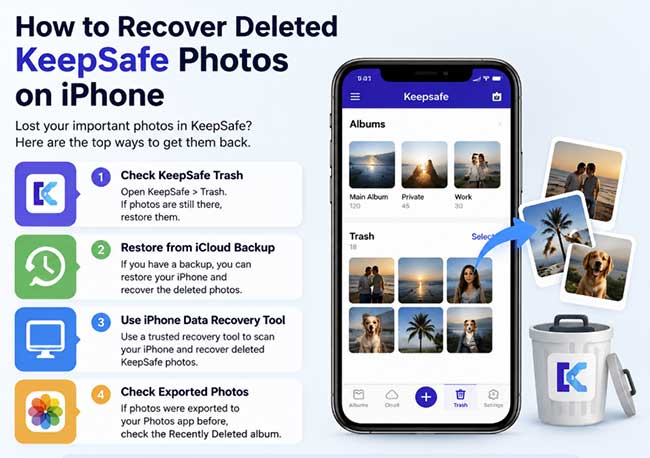
Can Keepsafe Pictures Be Recovered?
Yes, deleted Keepsafe pictures can sometimes be recovered, depending on how they were deleted and whether a backup or cloud feature was available. If the photos are still in the Keepsafe Trash folder, you can restore them directly from the app.
However, if you have emptied the Trash or permanently deleted the photos, recovery becomes more difficult. In this case, you may need to check backups such as Keepsafe Private Cloud or use an iPhone data recovery solution to scan for recoverable files.
How to Recover Deleted Keepsafe Photos?
There are 2 ways for you to recover deleted Keepsafe photos, try them one by one.
Option 1. Recovering Keepsafe Photos Through Albums
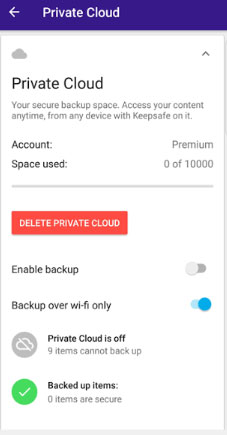
If you have enabled Keepsafe Private Cloud before deleting your photos, you may be able to restore deleted Keepsafe photos from the Trash folder. However, photo recovery depends on several conditions. Before starting, make sure the following requirements are met:
Requirements for Recovering Deleted Keepsafe Photos
1. Private Cloud was enabled before deletion
Keepsafe Private Cloud needs to be activated before the photos are deleted. In some cases, deleted or hidden photos may still be synced to the cloud, allowing you to download them later.
To enable Private Cloud:
- Step 1. Open Keepsafe and unlock your vault. Tap the menu icon (three dots).
- Step 2. Go to Settings and enable Private Cloud.
2. The Keepsafe Trash folder has not been emptied
Deleted photos can only be recovered if they are still available in the Trash folder. Once the Trash is permanently cleared, Keepsafe cannot restore those items through the app.
3. Your account supports photo recovery
Keepsafe Premium users and eligible trial users can restore photos from Trash. Free users may be able to view deleted items but may need to upgrade to recover them.
Steps to Recover Deleted Keepsafe Photos
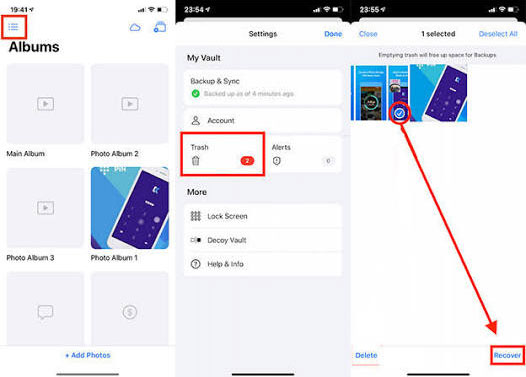
- Step 1. Log in to your Keepsafe account and open Albums. Tap the "Settings" icon in the top left corner.
- Step 2. Tap the Trash icon to view the deleted items.
- Step 3. Select the photos you want to recover.
- Step 4. Tap Recover and choose the album where you want to save them.
- Step 5. The photos will be restored immediately.
What to Do If Keepsafe Trash Shows Nothing?
If you cannot see any recoverable photos in Trash, check your Wi-Fi or mobile data connection and wait a few minutes for Keepsafe to sync. You can also try reinstalling the Keepsafe app and checking the Trash folder again.
If you still cannot recover deleted Keepsafe photos, try the other recovery methods below.
Option 2. Recover Deleted Keepsafe Photos on iPhone with TunesKit
The methods mentioned above can help restore deleted Keepsafe photos in some situations. However, they may not work if your photos are lost due to issues such as a factory reset, failed iOS update, system crash, or permanent deletion from the Trash folder.
In these cases, you can try a professional iPhone data recovery tool like TunesKit iPhone Data Recovery. It is designed to help recover deleted photos and other lost data from different scenarios, including accidental deletion, device reset, and system-related problems.
TunesKit iPhone Data Recovery provides multiple recovery options, allowing you to recover iPhone photos after factory reset. Before recovery, you can preview available files and select the photos you want to restore.
Key Features of TunesKit iPhone Data Recovery:
- Recover deleted Keepsafe photos from iPhone, and support the latest iOS version
- Preview photos before recovery and selectively restore the files you need
- Recover data from iPhone, iTunes backup, and iCloud backup
- Support common photo formats, including HEIC images
- Handle various data loss situations, such as accidental deletion, system crashes, and factory resets

Recover Keepsafe Photos with Ease
Restore deleted Keepsafe photos from your iPhone, even after accidental deletion, system issues, or data loss scenarios.
 600,000+ Downloads
600,000+ Downloads
600,000+ Downloads
Before you start, you can download the official TunesKit iPhone Data Recovery software directly on your computer. Have a quick installation and take the steps below:
Step 1Connect iPhone to Computer
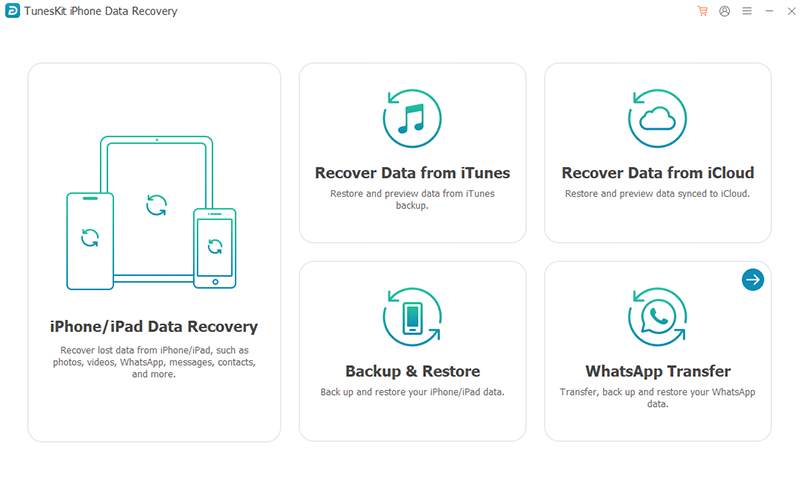
Launch the program of TunesKit iPhone Data Recovery you have on your computer. Select iPhone/iPad Data Recovery from the main interface. Next, follow the prompts to connect your iPhone. Note that you'll have to "Trust" the computer if it's the first time to build a device connection.
Step 2Straightly Scan Photos on iPhone
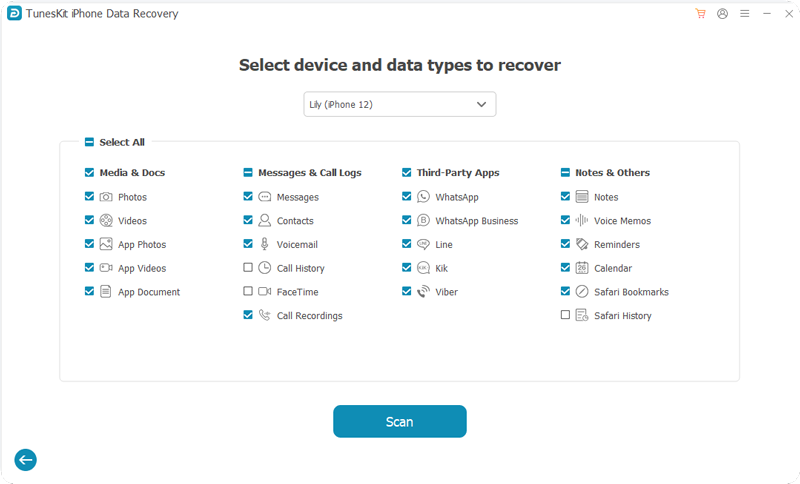
Once your iPhone is detected, TunesKit will show detailed device information and supported data types. Select "Third-Party Apps" and click "Scan" to start the process.
Step 3Preview and Recover Deleted Keepsafe Photos
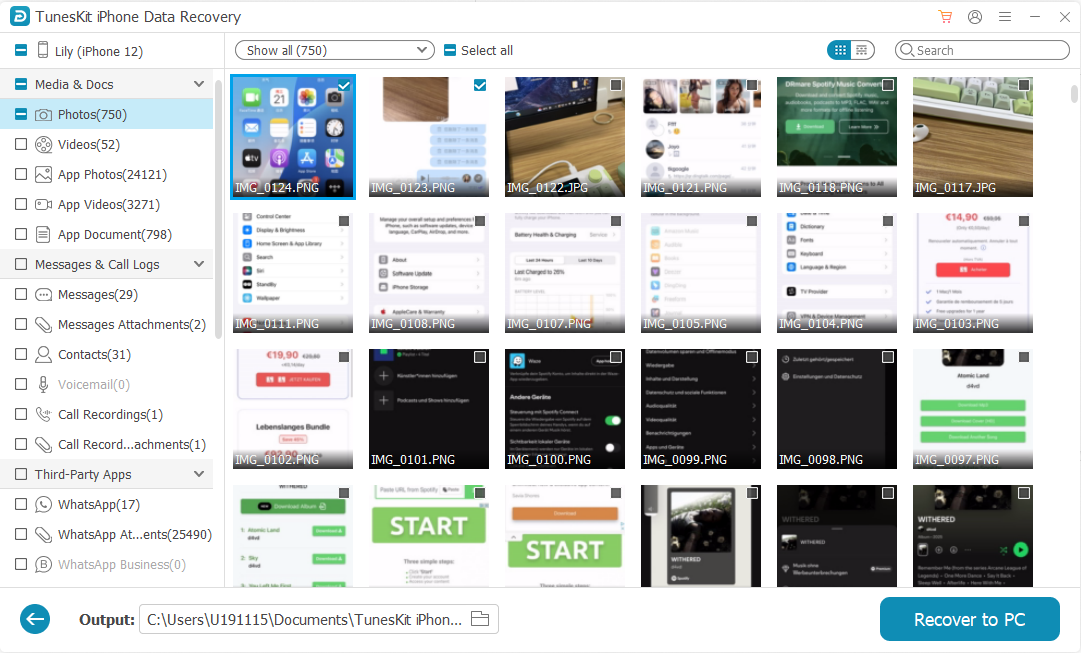
How long it takes to scan depends on the amount of data you have. After that, you can get access to preview both deleted and existing photos from your iPhone on the results page. Later, go on the way to choose whichever photos you'd like to get back, mark them and easily press on the top-corner "Recover to PC" option to export to your computer.
Tips for Keepsafe Recovery
-
Where Are Keepsafe Photos Stored?
Keepsafe photos are stored securely inside the Keepsafe app and cannot be accessed directly from the iPhone file system. If you have enabled Keepsafe Private Cloud or created an iPhone backup, you may be able to restore your photos from these backups.
-
How to Back Up Photos on Keepsafe?
Open the Keepsafe app on your iPhone and go to Settings. Tap Private Cloud, then enable the Enable backup option to protect your photos.
-
How Do I Recover My Keepsafe Account?
Open the Keepsafe app and enter your verified email address. A four-letter access code will be sent to your email inbox. Enter the code in the app to access your Keepsafe gallery again.
Final Words
We hope this guide has helped you recover deleted Keepsafe photos on your iPhone. TunesKit iPhone Data Recovery can improve your chances of retrieving lost photos. To prevent data loss, remember to back up your iPhone regularly. If you encounter any issues while using this software, feel free to leave a comment and share your feedback.


