


How to Change Location on OkCupid? 5 Easy Ways!
OkCupid is a data-driven dating platform known for its in-depth questionnaire that analyzes your values, beliefs, and preferences to create a personalized Match Percentage. This helps you form more meaningful connections while also offering strong inclusivity for diverse identities.
However, like many location-based dating apps, OkCupid prioritizes showing you people who are nearby. So, if you're planning to move, traveling, exploring matches in a different city, or simply for privacy concerns, learning how to change location on OkCupid can be incredibly helpful. And this is what you'll learn in this guide.

Part 1. How Does Location Work on OkCupid
Before diving into how to change your location on OkCupid, let's see how does location work on OkCupid.
OkCupid relies on your device's GPS (or your browser's IP address if you're on the web version) to determine where you are. This helps the app recommend nearby matches, making it easier to connect with people in your local area.
It will display potential matches around you and yours to nearby on the Discover feature. While this is convenient, it can also limit you to a smaller dating pool if you stay within the default settings.
To reach more people, you can customize your Search Radius, such as extending it to 15 or 20 miles, or Passport Stack for a longer distance relationship. This gives you access to a wider range of matches. However, unlike Tinder, OkCupid doesn’t show your distance in real time (like "5 miles away") unless you enable Use Current Location.
Part 2. How to Change Location on OkCupid for More Matches
If you’re not satisfied with the matches in your area or simply want to explore connections elsewhere, learning how to change location on OkCupid can help widen your dating pool. Below are three effective ways to update your location and connect with new people.
Way 1. Edit Your Profile Location Manually
Unlike apps like Tinder or Bumble that heavily rely on GPS, OkCupid gives you the flexibility to manually enter any city or ZIP code. This is especially handy if you’re traveling, planning a move, or want to meet people in another area before you arrive.
Here's how to change your location on OkCupid through the mobile app:
Step 1: Open the OkCupid app on your mobile device and tap your profile photo.
Step 2: Locate and click on the pen icon to edit your profile.
Step 3: In the location field, update your location to reflect where you're currently staying or traveling.
Step 4: Save your changes, and your matches will now align with your updated location.

If you're using OkCupid on PC or browser, you can easily update your location following these steps:
Step 1: Log in to your OkCupid account and navigate to the Settings page.
Step 2: Locate the Listed Location option and click on it.
Step 3: Enter your new location or choose the desired city or area.

This allows you to adjust your location conveniently, ensuring your profile matches your current or preferred area.
Way 2. Use TunesKit Location Changer to Change Location on OkCupid
If you want a more precise method, specifically to trick the "Nearby" feature that relies on real-time GPS data, you may need a dedicated GPS spoofing tool like TunesKit Location Changer.
TunesKit Location Changer is a powerful tool that enables you to accurately change location on OkCupid in one-click. No jailbreak or rooting is required. You can set a fake location anywhere in the world, right down to a specific street. It can also let you simulate movement in location-based games like Pokémon GO. With TunesKit Location Changer, you can change your location easily and securely without technical expertise.
 Key Highlights of TunesKit Location Changer
- Spoof your iOS & Android devices' GPS location in one click;
- Change location on Bumble and all other location-based dating apps;
- Simulates GPS movement with custom routes and adjustable speeds;
- Supports 360-degree joystick control to mimic real movement;
- Allows up to 10 device connections at the same time.
Find More & Better Matches on OkCupid with TunesKit Location Changer
Jump to any city worldwide, explore new matches, and expand your dating possibilities, all in just a tap.
 600,000+ Downloads
By using TunesKit Location Changer, you can expand your dating prospects on OkCupid, meeting new and exciting people from all over the world.
Step 1 Connect Your Phone
Download and install TunesKit Location Changer on your computer. Use a USB cable to connect your smartphone to the computer. Unlock your phone, confirm the connection, and complete the initial setup when prompted. Then, click Next and select the General Mode to start.

Step 2 Start to Change Location
A map will appear, showing your current location. Use the search bar to input the desired city or region where you want your OkCupid location to appear. Click Start Modifying to set your virtual location. The tool will update your device's GPS to reflect the new location.

Step 3 Successfully Change Location on OkCupid
Launch the OkCupid app on your device. Check that your profile now reflects the updated location.

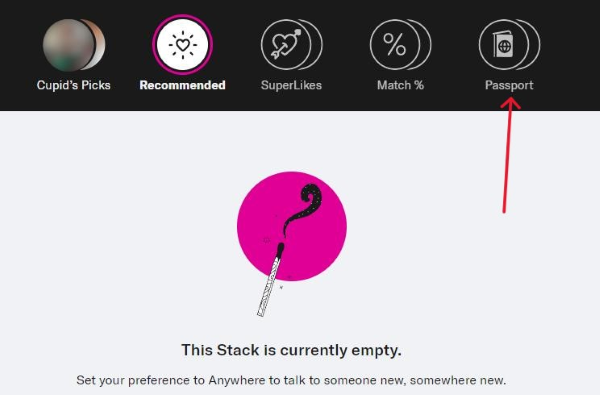
Way 3. Use Passport Stack Feature
If your goal is to meet people worldwide without altering your actual profile location, OkCupid’s Passport stack is a great built-in option. It’s perfect for long-distance connections or simply exploring profiles from different countries.
To use the Passport stack:
Step 1. Go to the Discover tab (the icon that looks like a stack of cards).
Step 2. Tap Passport at the Stack bar.
Step 3. Start swiping - you'll see active users from around the world who are also open to long-distance relationships.
Part 3. How to Change Location on OkCupid for Privacy
Sometimes the goal isn't to find more matches- it's to avoid being seen by certain people nearby. If you're wondering how to change my location on OkCupid to avoid coworkers, acquaintances, or ex-partners, the methods below focus on boosting your privacy and controlling who can view your profile.
Way 1. Enable Incognito Mode [Premium Feature]
The most effective privacy option is OkCupid's Incognito Mode, a paid feature designed to hide your profile completely from the general user pool. When activated, only people you "Like" or message will be able to see you, making your real location irrelevant to anyone you haven’t interacted with.
Step 1. Navigate to your Settings menu.
Step 2. Select Incognito Mode from the subscription options.
Step 3. Turn it on. Once enabled, your profile becomes invisible unless you initiate contact.
To turn it off later, head to: Profile > Settings > Private, and toggle off Incognito Mode.

Way 2. Change OkCupid Location via VPN
Using a VPN is another helpful option if you want to hide your real location or view matches from another region temporarily. A VPN masks your IP address and may cause the desktop version of OkCupid to detect your location differently.
Step 1: Install a reputable VPN app on your device (e.g., NordVPN, ExpressVPN).
Step 2: Open the VPN app and connect to a server in your desired location.
Step 3: Close and reopen the OkCupid app to ensure it recognizes the VPN's server location.
Step 4: Verify that your matches reflect the new location.

This method is simple, fast, and effective for protecting your privacy or casually exploring matches in another city or country.
Part 4. FAQs on Changing Location on OkCupid
-
1. Will changing my location affect my existing matches?
No, changing your location will not remove or affect your existing matches, but it will update your profile's location and potentially show you new matches from the new area.
-
2. How do I know if my location has been successfully updated?
After changing your location, you can verify it by checking the profiles and matches in your OkCupid feed. If your location has been updated, you'll see profiles from the new area instead of your original location.
-
3. Does OkCupid allow location changes without affecting my profile?
Yes, OkCupid allows you to update your location, especially if you're traveling or relocating. This change won't harm your profile but will update the distance of potential matches based on your new location.
Conclusion
After reading this guide, you should know how to change location on OkCupid for better matches or privacy protection. These methods are proven to work, and you can try them based on needs. Among them, TunesKit Location Changer take it a step further by allowing you to virtually place yourself anywhere in the world. With its user-friendly interface, precise GPS simulation, and versatility across platforms, it is the ultimate solution for exploring matches beyond your immediate surroundings.


