iFinder iCloud Unlock Review 2026: Is It Safe & Does It Work?

If you search for an iCloud Activation Lock removal tool, you may come across iFinder 2020, iFinder 2021, or iFinder iCloud Unlock. But is iFinder still working in 2026? Is it safe to download? And can you find an official version today?
This iFinder review covers its current status, features, limitations, and common workflow, along with a maintained alternative for supported iPhones.
 Note
Note
Only remove Activation Lock from a device you own or are authorized to manage. Activation Lock is designed to protect lost or stolen Apple devices.
- Quick Verdict: Is iFinder Worth Using in 2026?
- What Is iFinder iCloud Unlock?
- Does iFinder Still Work in 2026?
- Is iFinder Safe to Download?
- How Does iFinder iCloud Unlock Work?
- iFinder Pros and Cons
Quick Verdict: Is iFinder Worth Using in 2026?
| Question | Quick Answer |
|---|---|
| Does iFinder still work in 2026? | Difficult to verify |
| Is iFinder safe? | Download-source safety is unclear |
| Is there an official download? | A current official source is difficult to verify |
| Worth using? | Consider Apple options or a maintained alternative first |
Bottom line: iFinder may still appear in old tutorials and download pages, but there is not enough current information to confidently recommend it for Activation Lock removal in 2026.
What Is iFinder iCloud Unlock?
iFinder iCloud Unlock is a third-party utility that has been promoted as a way to remove iCloud Activation Lock on iPhones or iPads.
Older versions are usually called iFinder 2020, iFinder 2021, or sometimes iFinder 2022. Most guides describe it as a Windows-based program that asks for the locked device information such as the IMEI and serial number before processing an unlock request.
What Does iFinder Claim to Do?
Based on older iFinder pages and tutorials, the program has been associated with functions such as:
- iCloud Activation Lock removal;
- IMEI-based device processing;
- recovery or repair options;
- device information checking;
- support for selected iPhones, iPads, Apple Watches, and Macs.
However, these claims mostly come from older third-party pages. We could not find a clearly maintained official compatibility page that confirms which features and Apple devices are still supported in 2026.
What Devices Does iFinder Claim to Support?
Older sources have claimed support for various products, including:
- older iPhone models;
- several iPad generations;
- Apple Watch;
- some Mac computers.
Some old pages even claim support for almost any iOS version.
These claims should be treated carefully because we could not find a current official compatibility document to confirm them.
If you have a recent iPhone or a newer version of iOS, do not assume that iFinder works simply because an old download page says it supports "all devices."
Does iFinder Still Work in 2026?
There is no simple verified "yes" or "no" answer.
Older iFinder tutorials show that the software was designed to process iCloud unlock requests. However, we could not verify a current official iFinder website, 2026 release, recent changelog, or updated device compatibility list. That makes its present reliability difficult to confirm.
What Can We Verify?
As of 2026, we can verify that:
- iFinder 2020 and 2021 content is still available online;
- old tutorials show an IMEI/device-information-based workflow;
- multiple third-party websites still discuss the software.
What Cannot We Verify?
What we cannot clearly verify is:
- a currently maintained official iFinder website;
- an official 2026 version;
- current device compatibility;
- current pricing;
- an official success rate;
- continuing developer support.
For these reasons, iFinder is better viewed as an older iCloud unlocking tool than as a clearly maintained 2026 solution.
Is iFinder Safe to Download?
The main iFinder safety concern is not proof that every copy of the software is harmful. The bigger issue is download-source verification.
A clearly maintained official iFinder download page is difficult to identify today. That means users may end up downloading installers from file-sharing sites, old blogs, video descriptions, or other third-party sources.
Be Careful with iFinder Free or Cracked Downloads
Free or cracked versions of iFinder 2020/2021 found online may come from unofficial sources. Since a current official download cannot be clearly verified, it is difficult to confirm whether these installers are original or modified.
If you still check an old iFinder installer, verify the source, scan the file before opening it, avoid bundled software, and never enter your Apple Account password or sensitive information into an unknown service.
How Does iFinder iCloud Unlock Work?
Because there is no clearly verified current iFinder release, the following section describes the common workflow shown in older iFinder 2020/2021 tutorials. It is not a recommendation to download an installer from an unknown website.
What Older iFinder Versions Required
Older guides commonly mentioned:
- a Windows computer;
- a USB cable;
- the locked Apple device;
- device model;
- iOS version;
- IMEI number;
- serial number;
- iFinder login details in some versions.
Common iFinder Workflow
- Step 1. If you already have a trusted copy of iFinder 2020/2021, install it on a Windows PC and sign in when required. Since a current official download source is difficult to verify, avoid random third-party or cracked installers.
- Step 2. Connect the locked iPhone or iPad to the computer with a USB cable.
- Step 3. From the iFinder interface, select the option related to iCloud Unlock or Remove iCloud.
- Step 4. The program may ask for details such as the device model, iOS version, IMEI, and serial number.
- Step 5. Then submit the device information and start the unlock process. Some versions may also ask the device to be placed into Recovery Mode.

iFinder Pros and Cons
Based on the available information, here are the main advantages and limitations of iFinder.
 Pros:
Pros:- Simple interface in older versions.
- Straightforward device-information-based workflow.
- Many older tutorials are still available online.
 Cons:
Cons:- A current official website or download source is difficult to verify.
- Most available information comes from iFinder 2020/2021-era versions.
- Current device and iOS compatibility is unclear.
- Free or cracked installers may come from unknown sources.
- Current developer support and success rates cannot be reliably verified.
Before Using an iCloud Unlock Tool
Before trying iFinder or another third-party tool, check whether one of Apple's official solutions applies to your situation.
Option 1. Reset Your Apple Account Password
If the locked device belongs to you and you remember the Apple Account email address or phone number, resetting the password is usually the best place to start. Once you regain access to the account linked to the device, follow the Activation Lock screen instructions to activate it.

Option 2. Ask the Previous Owner to Remove the Device
If you purchased a used iPhone that is still linked to the seller's Apple Account, ask the previous owner to remove it. If the seller is no longer with you, they can use Find Devices on iCloud.com to remotely remove an eligible device from their account.
Do not take ownership of a used iPhone or iPad until it has been removed from the previous owner's account.

Option 3. Contact Apple with Proof of Purchase
If you own the device but cannot regain access to the Apple Account, Apple provides an Activation Lock support request for eligible users who have proof-of-purchase documentation.
These official options should normally be checked before using third-party Activation Lock software.

Best iFinder Alternative: TunesKit iPhone Unlocker
If Apple's official options are unavailable and your device is supported, TunesKit iPhone Unlocker is another option to consider for Activation Lock removal.
Unlike iFinder, TunesKit has a currently maintained official website, published compatibility information, and an updated Windows/macOS application. It is an all-in-one iOS unlocking program that includes several modes, such as:
- Remove iCloud Activation Lock;
- unlock screen passcodes;
- remove Apple Account;
- remove MDM restrictions;
- remove Screen Time passcodes.
For Activation Lock specifically, the current workflow does not require jailbreaking on supported devices. At the time of writing, TunesKit iPhone Unlocker Activation Lock removal feature supports from iPhone 5s through iPhone X running iOS 12.0 through iOS 16.7.15.
How to Remove Activation Lock with TunesKit iPhone Unlocker
The latest workflow is much simpler than the previous TunesKit Activation Unlocker process because a separate jailbreak procedure is no longer required on the currently supported Activation Lock workflow.
- Step 1. Download and install the latest TunesKit iPhone Unlocker on your Windows PC or Mac. Connect your iPhone using a USB cable. On the home screen, choose Remove iCloud Activation Lock. Click Start and read the information shown by the program before continuing.

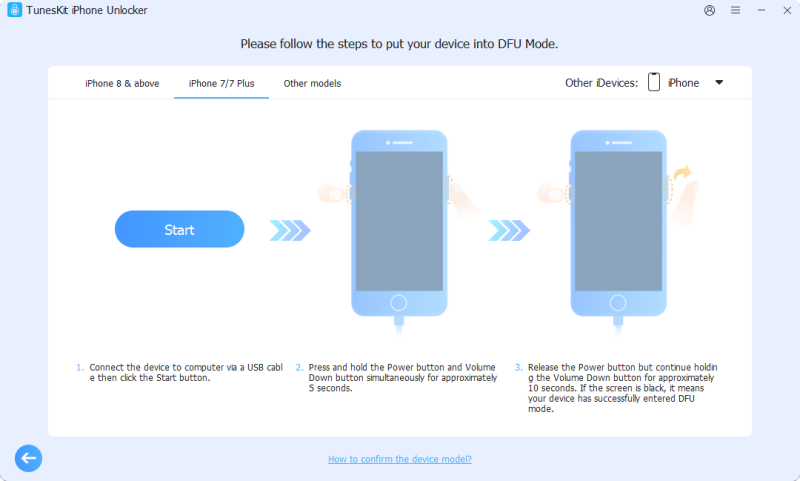
- Step 2. TunesKit will first guide the device into Recovery Mode. Then follow the on-screen instructions to manually enter DFU Mode. Make sure you follow the button sequence shown for your exact iPhone model.
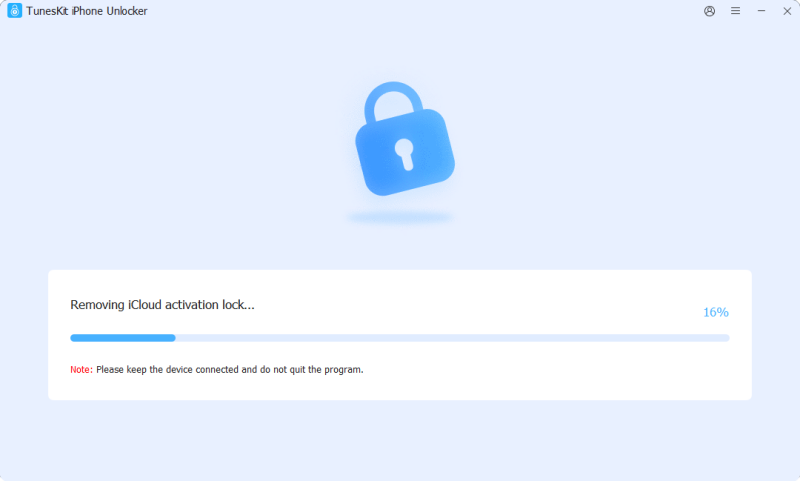
- Step 3. Once the device is successfully detected in DFU Mode, TunesKit starts the Activation Lock removal process. Keep the iPhone connected until the program finishes.
Note
Always check device compatibility first. Activation Lock removal is a specialized feature and does not support every iPhone or every iOS version.
iFinder vs TunesKit iPhone Unlocker
If you are deciding between the two programs, the biggest difference is not simply the interface. It is how easily you can verify current product information.
| Feature | iFinder | TunesKit iPhone Unlocker |
|---|---|---|
| Maintained official website | Difficult to verify | Yes |
| Current official download | Difficult to verify | Yes |
| Published compatibility information | Current information unclear | Yes |
| Activation Lock removal | Claimed by older versions | Yes, on supported devices |
| No-jailbreak current workflow | Cannot be verified | Yes, for the currently supported Activation Lock workflow |
| Windows &macOS support | Windows: Shown in older versions; macOS: Unclear for older iFinder versions | Yes |
| Screen passcode removal | Information varies | Yes |
| Apple Account removal | Unclear | Yes |
| MDM removal | Unclear | Yes |
| Current developer support | Difficult to verify | Available |
The main advantage of TunesKit is therefore transparency and current support information. You can check its official download, supported devices, instructions, and update information before deciding whether it fits your device.
This does not mean TunesKit works with every Activation-Locked iPhone. Its Activation Lock mode has a specific compatibility range, so checking your device first is essential.
FAQs About iFinder iCloud Unlock
-
Does iFinder still work in 2026?
It is difficult to confirm. Most available information refers to iFinder 2020/2021, and we could not verify a current official release, compatibility list, or recent update history.
-
Is iFinder safe to download?
The main concern is the download source. A current official iFinder website is difficult to verify, so avoid unknown or cracked installers and never enter sensitive information into untrusted software.
-
Is iFinder free to download?
Free copies of iFinder 2020/2021 can still be found online, but their authenticity and safety are uncertain. Some older versions may also require payment during the unlock process.
-
Where can I download iFinder?
We could not verify a currently maintained official download page. Most available links come from old blogs, videos, or third-party websites, so use caution before downloading.
-
Does iFinder support newer iPhones?
Current support for newer iPhones cannot be confirmed because there is no verified, up-to-date iFinder compatibility list.
Conclusion
iFinder iCloud Unlock was widely discussed through versions such as iFinder 2020 and iFinder 2021, but its current status is unclear in 2026. A maintained official download source, recent compatibility information, and current developer updates are difficult to verify.
If the device belongs to you, try Apple's official Activation Lock options first. For a supported older iPhone, TunesKit iPhone Unlocker provides a currently maintained alternative with published compatibility information and a jailbreak-free Activation Lock workflow. Always confirm that your exact device and iOS version are supported before proceeding.