How to Bypass or Remove Activation Lock on iPad mini 4

Stuck on the Activation Lock screen on your iPad mini 4? Whether you have an A1538 or A1550 model, the right solution depends on whether you know the linked Apple Account, can contact the previous owner, or have proof of purchase. Below, we'll cover the methods that still apply in 2026, from Apple's official options to an alternative for compatible iPad mini 4.

- Can You Bypass Activation Lock on iPad mini 4?
- Check Your iPad mini 4 Model: A1538 or A1550
-
How to Remove or Bypass Activation Lock on iPad mini 4
- Method 1. Remove Activation Lock with Apple Account or Passcode
- Method 2. Ask the Previous Owner to Remove Activation Lock
- Method 3. Remove iPad mini 4 Activation Lock via Find My or iCloud
- Method 4. Ask Apple to Remove Activation Lock with Proof of Purchase
- Method 5. Bypass Activation Lock on a Compatible iPad mini 4 with TunesKit HOT
- Which iPad mini 4 Activation Lock Method Should You Use?
- FAQs About iPad mini 4 Activation Lock Bypass
- Conclusion
Can You Bypass Activation Lock on iPad mini 4?
Yes, Activation Lock can be removed from an iPad mini 4 when you have the appropriate account access or proof of ownership. The easiest options are entering the linked Apple Account or device passcode, asking the previous owner to remove the iPad from Find My, or requesting help from Apple with valid proof of purchase. Apple documents all three approaches in its current Activation Lock guidance.
For an older iPad mini 4 that you own or are authorized to manage, a compatible third-party tool can also provide an alternative. However, these methods may have device, iOS, jailbreak, and post-removal limitations.
Check Your iPad mini 4 Model: A1538 or A1550
Before attempting iPad mini 4 Activation Lock removal, check the model number on the back of the device.
Apple identifies A1538 as the Wi-Fi version of the iPad mini 4 and A1550 as the Wi-Fi + Cellular version. Both belong to the iPad mini 4 generation released in late 2015.
Knowing the exact model is especially useful when checking whether third-party Activation Lock software supports your locked device.
How to Remove or Bypass Activation Lock on iPad mini 4
There are several ways to remove or bypass Activation Lock on iPad mini 4, depending on whether you know the linked Apple Account, can contact the previous owner, or have proof of purchase. Below are the most practical options to try.
Method 1. Remove Activation Lock with Apple Account or Passcode
If you know the Apple Account associated with the iPad mini 4, this is the simplest and most complete solution.
- Step 1. Turn on the iPad mini 4 and connect it to Wi-Fi.
- Step 2. Continue through the setup process until the Activation Lock screen appears.
- Step 3. Enter the Apple Account email address or phone number and password previously used to set up the iPad.

If the screen provides a device-passcode option, you can follow the onscreen instructions and enter the passcode instead. Apple currently states that Activation Lock can be removed on the device using the Apple Account credentials originally used to set it up, or the device passcode when that option is available.
If you simply forgot the password, recovering your Apple Account should be your first choice because it preserves normal access to Apple services.
Method 2. Ask the Previous Owner to Remove Activation Lock
If you bought a second-hand iPad mini 4 and it is still linked to the seller's account, you do not need to ask them to give you their password.
Instead, ask the previous owner to sign in to iCloud.com/find, select the iPad, and select the Remove option to remove it from their account.
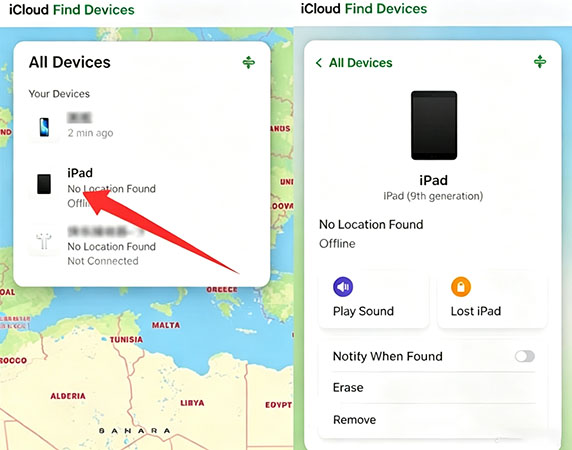
When necessary, the previous owner may first need to erase the device and then choose Remove. Apple states that once Activation Lock is turned off, another person can activate the device with their own Apple Account.
This is usually the best option for a legitimately purchased used iPad because it removes the original account association instead of working around it.
Method 3. Remove iPad mini 4 Activation Lock via Find My or iCloud
If the iPad belongs to you and you are already signed in to the same Apple Account on another Apple device, you can also use Find My.
- Step 1. Open Find My on another iPhone or iPad.
- Step 2. Choose Devices and select the locked iPad mini 4.
- Step 3. If required, erase the iPad.
- Step 4. After the erase is complete, select Remove.
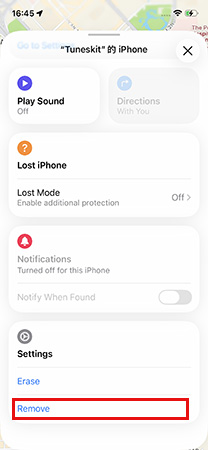
You can perform the equivalent operation online through iCloud.com/find. Apple confirms that removing the device this way turns off Activation Lock so that it can be activated again.
Method 4. Ask Apple to Remove Activation Lock with Proof of Purchase
If you own the iPad mini 4 but can no longer access its original Apple Account, Apple provides an official support route.
Apple currently states that users who need help removing Activation Lock and have proof-of-purchase documentation can start an Activation Lock support request. This option is particularly useful when you are the legitimate owner but have lost access to the account associated with an older iPad.
Prepare valid purchase documentation that identifies the device and ownership before submitting the request.
For users searching for a free iPad mini 4 Activation Lock removal method, the official account, Find My, previous-owner, and Apple-support routes should always be checked before paying for a third-party service.
Method 5. Bypass Activation Lock on a Compatible iPad mini 4 with TunesKit
If Apple's account-based options are unavailable and the device belongs to you or you are authorized to manage it, TunesKit iPhone Unlocker offers an alternative for compatible older devices.
Its dedicated Remove iCloud Activation Lock mode is designed to help users regain access without entering the original Apple Account password. One of its latest improvements is jailbreak-free Activation Lock removal on selected devices. Currently, TunesKit officially lists iPhone 6s through iPhone X running iOS 12–16.7.15 for its no-jailbreak method. For older devices such as certain iPads, the required process may differ, so check the latest compatibility information before starting.
Key Features of TunesKit iPhone Unlocker
Remove iCloud Activation Lock without the original Apple Account password. Support iPad mini 4 and other compatible older iOS devices. No complicated technical skills are required.
 600,000+ Downloads
How to Use TunesKit on iPad mini 4
Step 1. Connect the iPad mini 4
Install TunesKit iPhone Unlocker on a compatible Windows PC or Mac, launch it, connect your iPad, and choose Remove iCloud Activation Lock.

Step 2. Put iPad Into Required Mode
Follow the instructions to put your iPad mini 4 into required Mode.
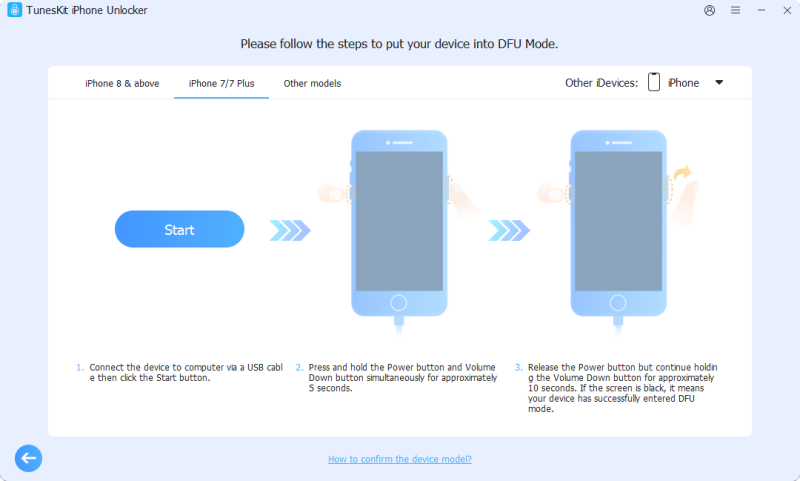
Step 3. Follow the software instructions
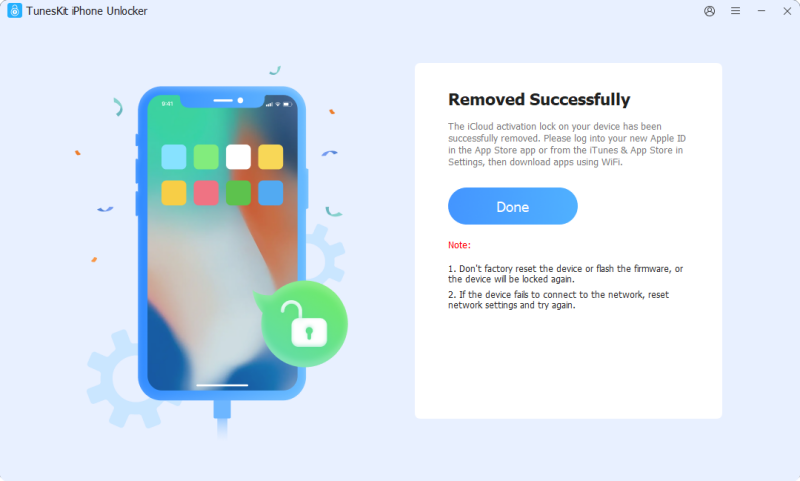
Continue with the onscreen preparation process supplied by TunesKit and start Activation Lock removal once the device is ready. This process will take a few minutes.
Which iPad mini 4 Activation Lock Method Should You Use?
- If you remember the linked Apple Account, use it directly on the Activation Lock screen.
- If you bought the iPad from someone else, ask that person to remove it through Find My.
- If you own the device but cannot recover the account, use Apple's proof-of-purchase support route.
- For a compatible A1538 or A1550 device that you own and cannot unlock through those options, you can check whether its iOS version is supported by TunesKit iPhone Unlocker.
FAQs About iPad mini 4 Activation Lock Bypass
-
How do I bypass iCloud on iPad mini 4 A1538?
A1538 is the Wi-Fi version of iPad mini 4. Start with the Apple Account, Find My, previous-owner removal, or Apple's proof-of-purchase process. If those are unavailable, check compatibility before considering a third-party option.
-
Can Activation Lock be removed from iPad mini 4 A1550?
Yes. A1550 is the Wi-Fi + Cellular model of the iPad mini 4. The same Apple Account and Find My removal methods apply.
-
Does a factory reset remove Activation Lock from iPad mini 4?
No. Erasing or restoring the iPad does not by itself remove its Activation Lock association. Apple designed Activation Lock to remain effective even after the device is erased until the appropriate account-based removal is completed.
Conclusion
There are several ways to handle Activation Lock on an iPad mini 4 A1538 or A1550, but Apple's account-based methods should come first. Use the linked Apple Account, ask the previous owner to remove the device through Find My, or contact Apple with proof of purchase when applicable. For a compatible device you own, TunesKit iPhone Unlocker provides another option, but check its iOS support before proceeding.